Nerdio product and feature suggestions (Original Thread through 2022) (Completed)

Hello everyone!


Please let us know your suggestions to improve, add or change functionalities in Nerdio Manager for MSP, via the comments section below. 


We appreciate all of our partner feedback and are always adding new features based on the community.


You can view upcoming and available features here


2

Comments (111 comments)

0
Avatar
Jason Bridgeman

Gotcha! Thanks DStephenson.  That should be an easy feature request fix though. To allow the Burst hosts when available sessions below: to show up even if we have the Burst beyond base capacity set to 0. If I have 10 servers in a pool, and want to keep it at 10 servers, I would still like to not have 9 users wait 15 minutes booting up the next server once host capacity is reached.
For now, I can leave the Burst beyond base capacity to 1 just to use this feature as I keep tight control over which users have access to the pool and I will never go above my desired base. 

0
Avatar
Brian Mock
(Edited )

When creating a new Azure Files Share from NMM add new customer account GUI, I would like to see the below additions to configuration options:

  1. Ability to specify ZRS for storage account redundancy
  2. Ability to specify AD DS OU for AD joined storage account
  3. Ability to create a Private Endpoint
0
Avatar
Kid Kooijmans

Hi,

It seems there is no easy way to assign a security group to a RemoteApp application group and another security group to a Desktop app group withing a host pool. When you define RemoteApp groups and Desktop groups in a host pool, every new security group assignment is assigned to all of them.

0
Avatar
Amol Dalvi

Brian Mock - thank you for your suggestions. I will review with my tech team.

0
Avatar
Amol Dalvi

Hi Kid Kooijmans - can you please tell me more about your use case. Why are you wanting to assign a security to a Remote Applications app group but not the Desktops app group (or vice versa)?


0
Avatar
Kid Kooijmans

Hi Amol,

We have a customer where all the users only get a remote app. But only a few admin/powerusers get a remote desktop in the same host pool. So, I need to be able to differentiate within the same hostpool. I can do this in the Azure portal but not via Nerdio.

0
Avatar
Koen Caerts

Hi, 

It would be great to have the possibility to run scripts scheduled on images in Nerdio MSP like it's already in Nerdio for Enterprise

That way it's easier to keep the image up to date, like Windows updates and software updates


0
Avatar
Amol Dalvi

Hi Koen Caerts - the Set as Image task can be run on a schedule, and you can run Scripted actions as part of that task. Does that help? Additionally, in the December release, we will have a way to Power ON an image on a scheduled basis and run scripts on the image VM (the Set as Image schedule runs scripts on the temp VM). 

0
Avatar
Brian Mock

THIS, thank you! Much needed improvement!

Additionally, in the December release, we will have a way to Power ON an image on a scheduled basis and run scripts on the image VM (the Set as Image schedule runs scripts on the temp VM). 

0
Avatar
Koen Caerts

Amol Dalvi, thanks for the reply

Additionally, in the December release, we will have a way to Power ON an image on a scheduled basis and run scripts on the image VM (the Set as Image schedule runs scripts on the temp VM). 

This is exactly what we need  

1
Avatar
Jason Bridgeman

I would like to ask that Migrations to NMM would fix the AADDS issue.
Before NMM we were using Cloud Jumper. If we setup an AADDS configuration in Cloud Jumper and then migrate that to NMM, I would select use existing AADDS.
However, once the new account shows up, and you go into Settings and Integrations, the directory shows as Active Directory.
I have to create a new directory for AADDS, make it default, then delete the Active Directory.

The same happens when we migration an account out of one NMM instance and into another.
I have had issues in the past when we create a new server after import and it will not join the AADDS.
When I reached out to support, they told me it was because the directory was set to Active Directory and not AADDS.


-Thanks!

1
Avatar
Moses Hull

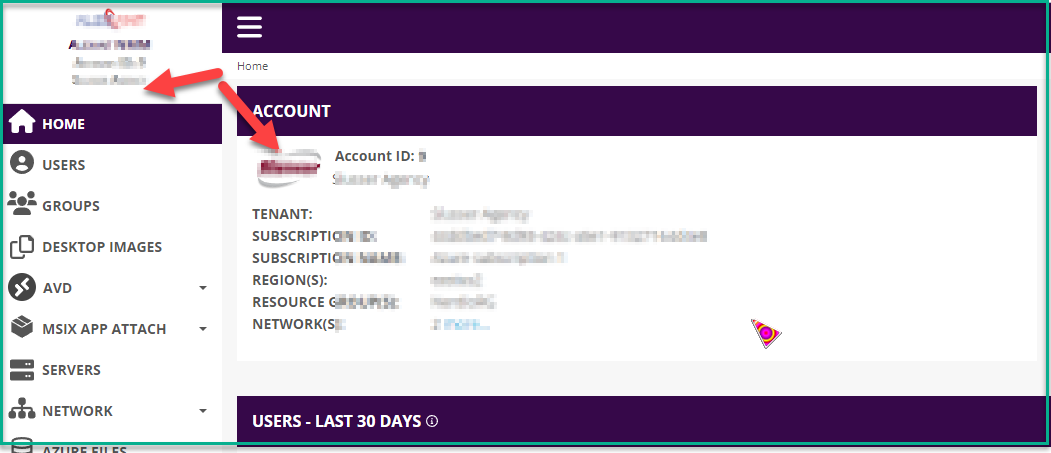
I know this is cosmetic but would it be possible to have the Client Logo appear in the top left corner when you are in the account. When working with so many clients you can accidently make changes in the wrong client. The logo in the top left corner would be a nice visual queue to reduce the possibility of a mistake. I know the name is there, but the logo being there would be very helpful.

0
Avatar
Moses Hull

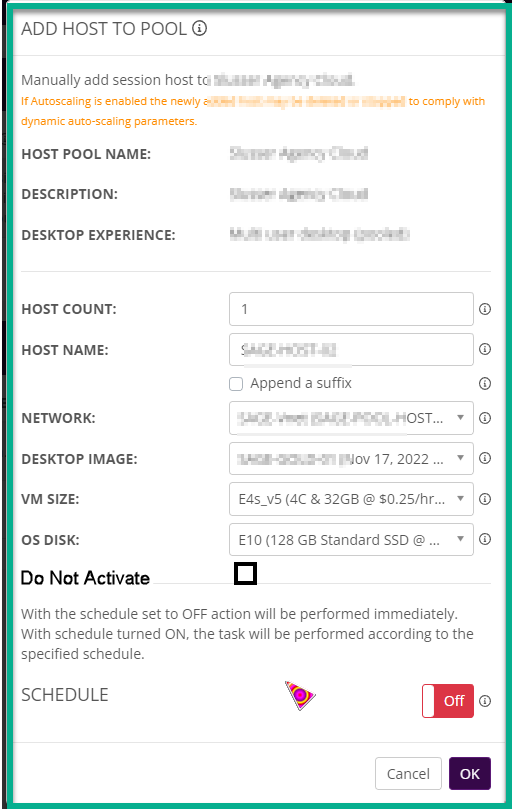
It would be nice to have a De-Activate or Do Not Active when you add a additional host. I have some sites where I have to put in a special piece of software and reboot the machine before I can put it into service.

0
Avatar
DStephenson

+1 Moses Hull
It is quite annoying to be provisioning a new host and have users logging in before it's ready.
We usually are fighting the AutoScale feature.

We use the Delay host availability in AVD for 10 minutes/Set host to drain mode on creation runbook, but sometimes AutoScale thinks it's smarter than us and makes the host available before we're ready.

The only way we've been able to work around that is to disable AutoScale, provision the host, Activate the host, enable AutoScale.

1
Avatar
Amol Dalvi

Moses Hull and DStephenson - fair point. I will add that checkbox that Moses suggested, to set a newly added host in Drain mode so that users are not allowed to log in to the host.

And good idea about the logo.

0
Avatar
Martijn Van Braeckel

Hi,

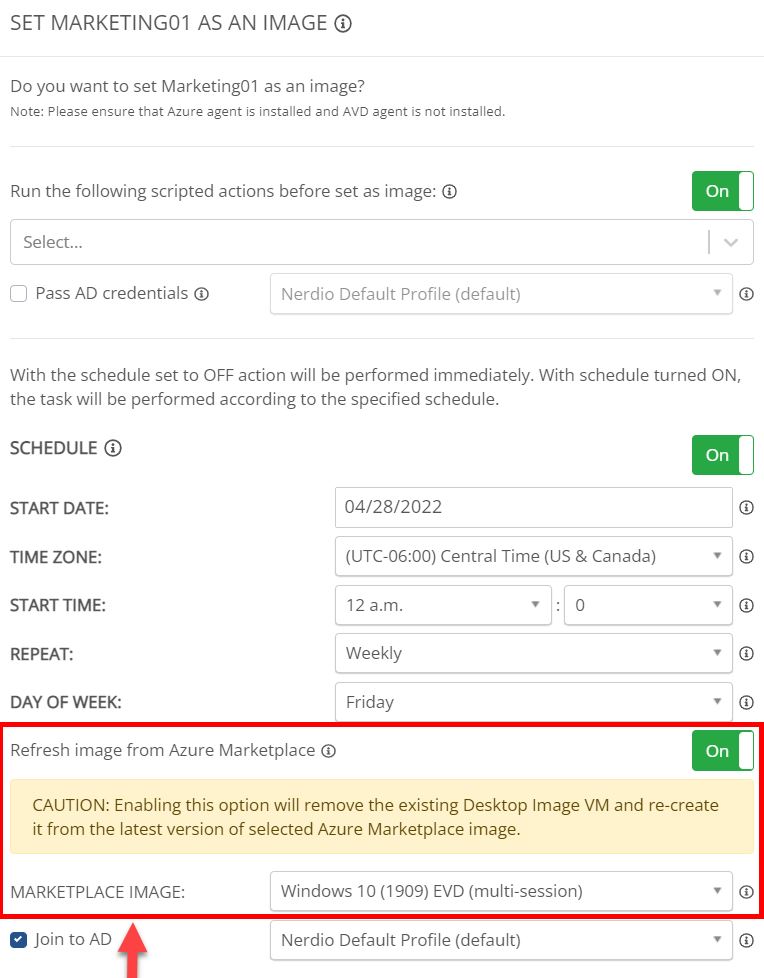
It would be nice to have an option available to "refresh" our desktop image with the latest version of the marketplace image.
If we'd like to perform this action now, we have to delete our desktop image first and recreate it. This also conflicts when autoscaling is linked to the desktop image.
I raised this request earlier but didn't received feedback on this one.

Regarding windows scripts and Azure runbooks, a nice feature would be to have a kind of template available where you're able to specify different scripts and runbooks in a predefined order to be executed on the image device.

Kind regards.

0
Avatar
DStephenson

+1 Martijn Van Braeckel

It would be nice to be able to group scripted actions together in a certain order so you could apply those to host pools easier than trying to remember/add/sort the individual scripts.

For the "image refresh", we played around with the idea of only using the "vanilla" images and deploying all applications/settings with scripted actions/Intune however it has its own drawbacks (i.e. 3-ish hour deployment per host).

The closest "perfect" solution is to have a custom image and then use a scripted action to deploy windows updates to the image.
Then, for the running hosts, we use Ring Groups (through Intune) for updates.


0
Avatar
Amol Dalvi

Hi Martijn Van Braeckel - regarding refreshing the desktop image, I suggest you create a new image with the latest Marketplace image, run SAs, etc.  like you always do, and then switch the Desktop Image (Template) from the Auto-scale configuration screen for your host pools. 

DStephenson and Martijn - fair point about grouping SAs & runbooks, and having that sorted and ready to go as a template. I have that on my backlog.

0
Avatar
Martijn Van Braeckel

Thanks for the feedback, Amol.

Regarding the image refresh, this feature is available in Nerdio Enterprise while performing the "Power off and set as image" action. Any chance it comes to Nerdio MSP as well?


0
Avatar
Amol Dalvi

Hi Martijn Van Braeckel - can you please let me know what you are referring to in NME. A screenshot would be helpful. Thanks!


1
Avatar
Brian Mock

The current process for Re-Imaging a host pool after updating the desktop image could be improved. We are finding it human error prone for our lower-level support team. For example, customer needs a client application updated. After tech updates the image, they browse to the Host Pool > Hosts > re-size/re-image, and because we have the host pool automatically re-imaged on a scheduled basis, they are immediately presented with a message that "Existing schedule is currently active. Delete the current configuration before making changes". That is where our problem starts. We don't want the existing schedule changed. We just want the tech to be able to re-deploy the host pool from the updated desktop image immediately, and that is all. We want to leave the schedule that is already configured intact, instead of relying on a human to re-create the schedule when they are done re-deploying the host pool. 

As it stands now, they must delete the schedule, issue the host pool re-image without a schedule (so that is occurs immediately), then go back and issue another re-image, but this time selecting the schedule toggle and setting for what was already configured (in our case, daily).

0
Avatar
Jason Bridgeman

Would it be possible, within NMM, to create a group at the MSP level so we may assign new accounts to the group?
Every time I add a new account to NMM, I must find every tech, in the role assignments, that will be supporting that client and add that new client to each tech.
We have a POD structure and we have X number of techs in a POD. We then assign X number of clients to these PODs. We do not want all techs to have access to all clients.
If we could set the techs in a account permission group, lets call it POD1, then assign any new accounts to the same POD1 group, then only the techs in POD1 could see the clients in POD1.

0
Avatar
Martijn Van Braeckel

Amol Dalvi, this is the option I was referring to.

0
Avatar
Amol Dalvi

Martijn Van Braeckel - thank you for the screenshot. I have added your request to the backlog. I don't have a definitive timeline to share with you at this point.

0
Avatar
Amol Dalvi

Brian Mock - would the "Automatically re-image used hosts" option on the Autoscale > Configure screen work for you?


0
Avatar
Amol Dalvi

Good suggestion Jason Bridgeman. I have added your request to the backlog. I don't have a timeline that I can share with you at this point.

0
Avatar
Koen Caerts

Hi,

Will the option to use a pattern in a host name, {????} or {####}, also become available in one of the next updates?

We use this in Nerdio for Enterprise and noticed it's much easier for users when they need to report an issue if the hosts have an easy-to-read name instead of a prefix with random number and letters

0
Avatar
Amol Dalvi

Hi Koen Caerts - yes, we will port over that feature to NMM. Thank you for your suggestion.


0
Avatar
Brian Mock

Amol Dalvi, regarding your follow-up question for using "Automatically re-image used hosts" option on the Autoscale > Configure screen. The issue we're having when that setting is enabled is we seem to lose control as to the timing of when a re-image occurs. Since it triggers as soon as the last user logs off, which could be during business hours in certain situations. 

1
Avatar
Tom Walshe

Would it be possible to add additional messaging schedules to the Scale In process? On our old WVD setup we would have issued a message to signed in users at 15, 10 and 5 minutes before it was powered down warning them of this. I know one message should be enough, but from experience it's not and we'd feel a lot more comfortable knowing the user had multiple warnings.

Post is closed for comments.