Nerdio product and feature suggestions (Original Thread through 2022) (Completed)

Hello everyone!


Please let us know your suggestions to improve, add or change functionalities in Nerdio Manager for MSP, via the comments section below. 


We appreciate all of our partner feedback and are always adding new features based on the community.


You can view upcoming and available features here


2

Comments (111 comments)

0
Avatar
Amol Dalvi

Good request Phil. I will add your suggestion to the product backlog. No promises on timing, but something we will certainly consider.


0
Avatar
Kid Kooijmans

Hi,

It would be nice to be able to create an application group in the Nerdio portal. It is one of the few things we still need to do separately in the azure portal.

Best regards,

Kid

0
Avatar
Amol Dalvi

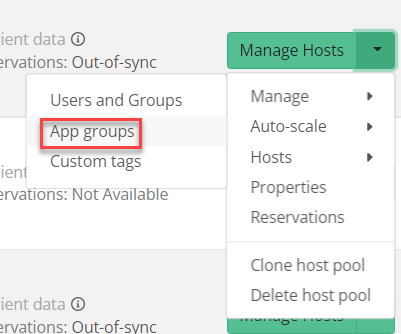
Hi Kid Kooijmans - it is possible to manage App Groups in Nerdio Manager. It's in the action menu for each Host Pool, under Manage. See this screenshot:


Let me know if this is what you were looking for.


0
Avatar
Kid Kooijmans

Hi Amol,

Thanks for your reply.

Indeed you can link the app group to the host pool there but if I'm not mistaken, you can not create the app group in azure.

0
Avatar
Amol Dalvi

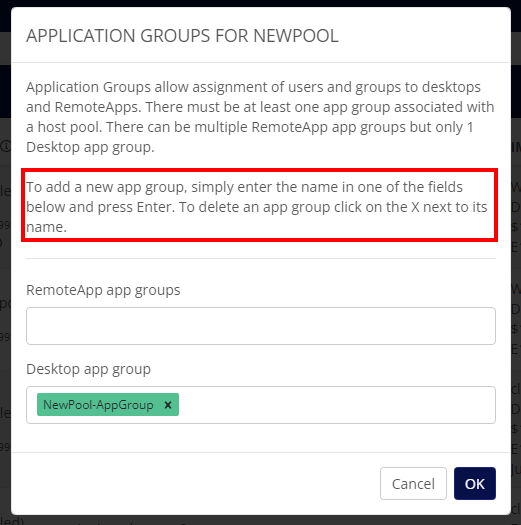
Hi Kid Kooijmans - Yes, you can create app groups too. Just enter the name and system will take care of creating a new one.


0
Avatar
Kid Kooijmans

Sorry Amol, I seem to have missed that one.

Thanks for the info!

0
Avatar
Tomas

Would like to suggest the following features.

For the pre-stage settings (or adding a different menu) would like to be able to schedule a monthly spin up all servers for some time to run maintenance and updates. Example The 1st Saturday of every month turn on all servers at 2 am for 1 hour and ignore auto-scale. This can currently be done on a weekly/daily basis but the option to do it monthly would be nice.

For new server deployments adding an option have server start in drain mode and ignore auto-scale for x time to allow for policies and apps that can not be done in image.

An option to have auto-scale disabled or modified but revert after x time similar to the turning on an image's option to turn image off after a few hours if it is forgotten. The idea would be to give some techs the ability to bypass auto-scale for some work but not make changes / prevent techs from forgetting to change auto-scale back.

0
Avatar
Brandon Rutledge

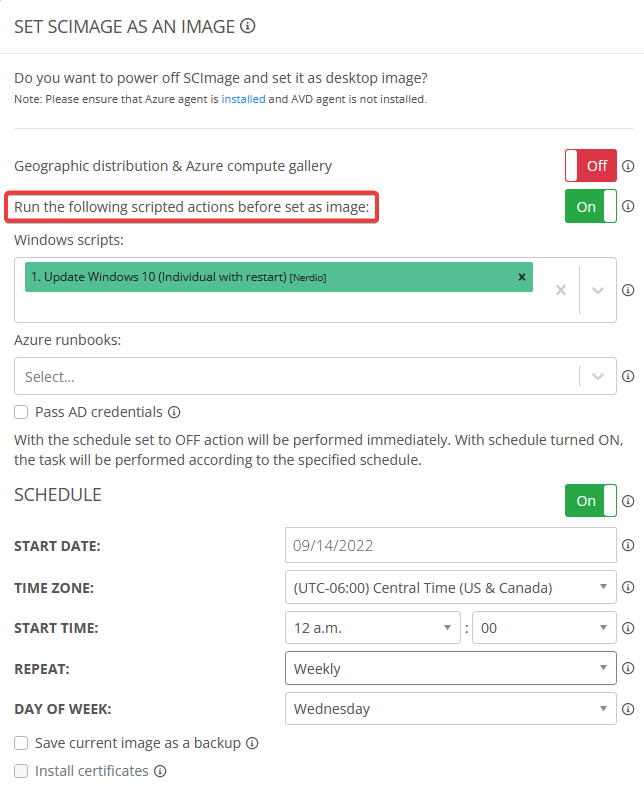
It would be great if Windows scripts had an option to be scheduled to run on the source VM instead of the temp VM:

0
Avatar
Martijn Van Braeckel

Hi,

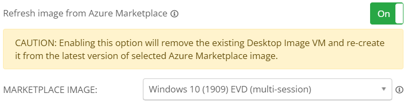
In the Nerdio enterprise version there is an option to refresh the image from the Azure Marketplace in the "Set As Image" menu.

Is there any chance to include this option in the MSP version as well?

Additional, it would be nice to have this feature also on the imaging device without the need to delete the imaging device.

0
Avatar
James Hughes

Hi Team,

At the moment, we can use the FSLogix integration profiles to specify some setting we use, but the settings which reside in the "FSLogix Registry Options" section only apply to the HKLM\SOFTWARE\FSLogix\Profile hive. Not all settings we need reside here, notably we have settings in the following locations:

HKLM\SOFTWARE\FSLogix\Logging
Path for logging and option to enable logging
HKLM\SYSTEM\CurrentControlSet\Services\frxccd\Parameters
Path for Cloud Cache Directory
HKLM\SYSTEM\CurrentControlSet\Services\frxccds\Parameters
Path for Proxy Directory and Write Cache Directory for Cloud Cache

It would be very beneficial if NMM had either of the following options:
1) Ability to specifically specify the keys for Logging and Cloud Cache paths
2) For all settings from the FSLogix ADMX to be available in an "advanced" tab, which would be more user friendly than setting the Reg keys.

At the moment we use GPO to set most of these settings, but as we are looking to use Azure AD in the future it would be very desirable to be able to control this in Nerdio directly.

Kind regards,
James

0
Avatar
Amol Dalvi

Hi James - thank you for the idea & suggestions. I will discuss with my engineering team.


0
Avatar
Brian Mock
(Edited )

View scheduled scripted actions that are configured

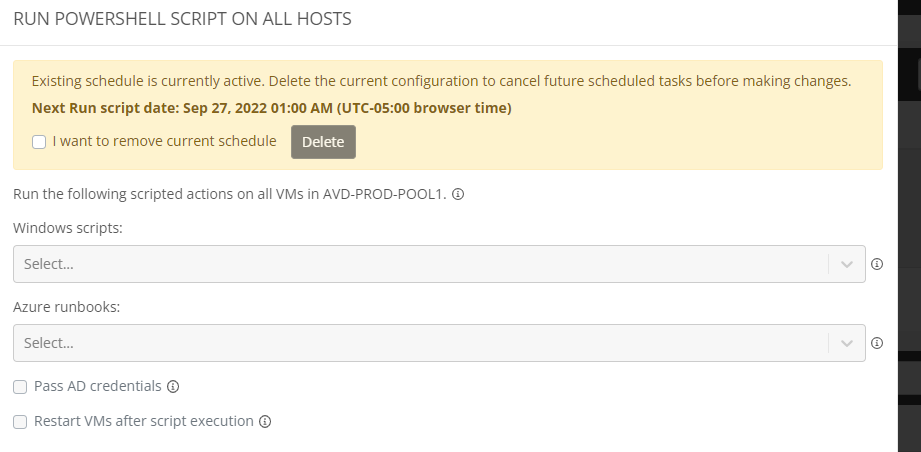
Having the ability to view what scripted actions are set to run on a schedule (either on a Desktop Image or Host Pool) would be beneficial. As it stands now, there is a small "clock" symbol that signifies something is scheduled, but if you click the hyper-link in the pop-out message, it doesn't show you what scripted action(s) are configured to run. If another tech sets this, how does anyone else know what is configured? Example below for a host pool that has a monthly scripted action run. There is nothing that shows what is set to run when you click the "Run PowerShell script on host pool VMs" hyper-link. Along with that, it would be a fantastic improvement to allow editing an existing schedule/actions, instead of having to delete and configure from scratch.

0
Avatar
Brian Mock

I second Brandon Rutledge in that we need the ability to run scheduled scripted actions against the base/golden Desktop Image VM, not just for power off and set as image task. Example issue we're facing is a tech goes into NMM customer account, power's on the Desktop Image VM, and is starting off with an out of date OS (depending how long ago the base image VM was created). This is opening up human error opportunity for missing a task such as updating Windows OS, MS Office, Teams, before power off and set as image. If the automation allowed for scheduled scripted actions to run against the Desktop Image VM, that would allow less room for human error, and less time spent by the tech updating the VM if all they're needing to do is focus on installation of a new app.

0
Avatar
Andre Zanoncello

+1 on Brian Mock and Brandon Rutledge idea. 

No current way to automatically or script updating of the golden image. This is important if we want this type of environment to be sustainable going forward.

0
Avatar
Chris Widhelm

Feature request for multitenant authentication


I need the ability to allow Customer Administrators to be able to login to NMM without having to invite them as guests into my Azure AD directory.

The app registration is already configured to allow it, but the interface does not have a way to support this since the user must be present in the directory before they can be added with a security role.

Any of the following options would work:

  1. the user needs to be able to login to NMM, grant consent to use their identity, and be added with no permissions to NMM
  2. the user can be invited to login, in which case they would grant consent to their identity and then be granted permissions
  3. Allow NMM to be configured to leverage Azure AD B2C

I just need the ability to allow users to use NMM and not have them pollute my Azure AD directory.

Let me know if you have any questions or need clarity.

0
Avatar
Amol Dalvi

Good suggestion, Chris. I will discuss with my dev team and look in to this.


0
Avatar
Jason Bridgeman

A few feature requests:

Can we get NMM to build a custom AADDS domain under 15 characters when a client has an AAD domain over 15 characters?

Right now, we have to get into the Azure portal, and build a custom AADDS by hand, then return to NMM to add the new customer account.

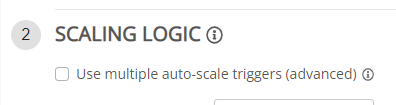
I know 3.7 will have dual scale out triggers. Maybe this feature will be part of it?


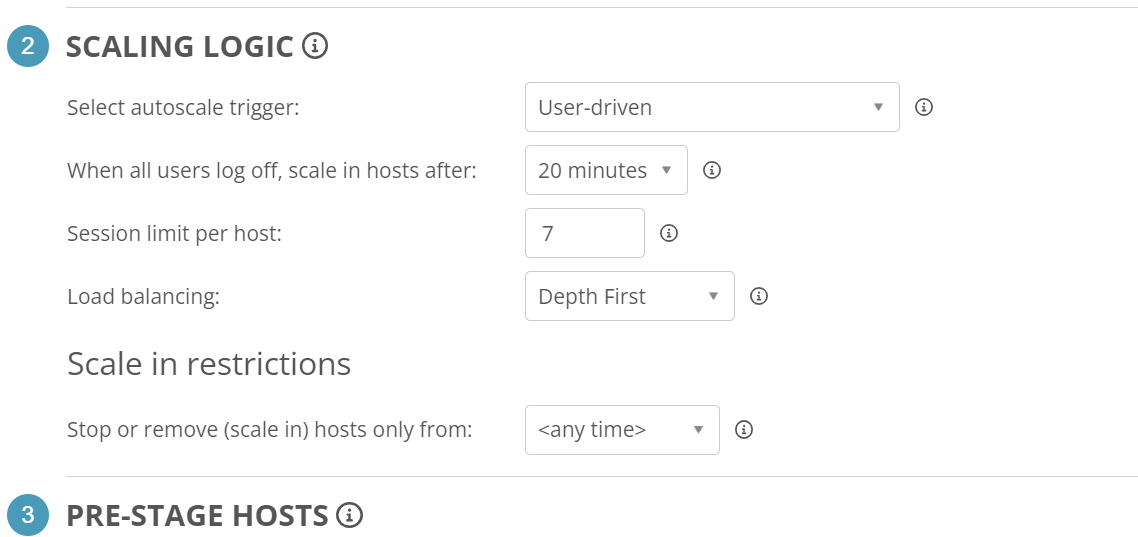
In the Auto-scale Scaling Logic, User-driven was created to allow start VM on connect.

Can we get an additional option, just like in the "Available sessions" trigger, to maintain up to X available sessions?

On top of that, I have noticed we need to toggle the Start VM on connect within the host pool properties when we set user-driven as the scaling trigger and the Stopped OS Disk Type will not set the disk back to SSD if a user turns on the server via start VM on connect.


Lastly, can we get a login time for each user within the "User Sessions" section?

Just to have a quick look on how long they have been logged into the host.

0
Avatar
Martijn Van Braeckel

Hi,

At this moment we're unable to modify or choose some advanced settings like "Security Type" or "Boot diagnostics" on the session host.
Is it possible to integrate these settings as well?

Maybe a solution could be to use a reference VM for these kind of settings. New session hosts can inherent those settings.

0
Avatar
Phil Long
(Edited )

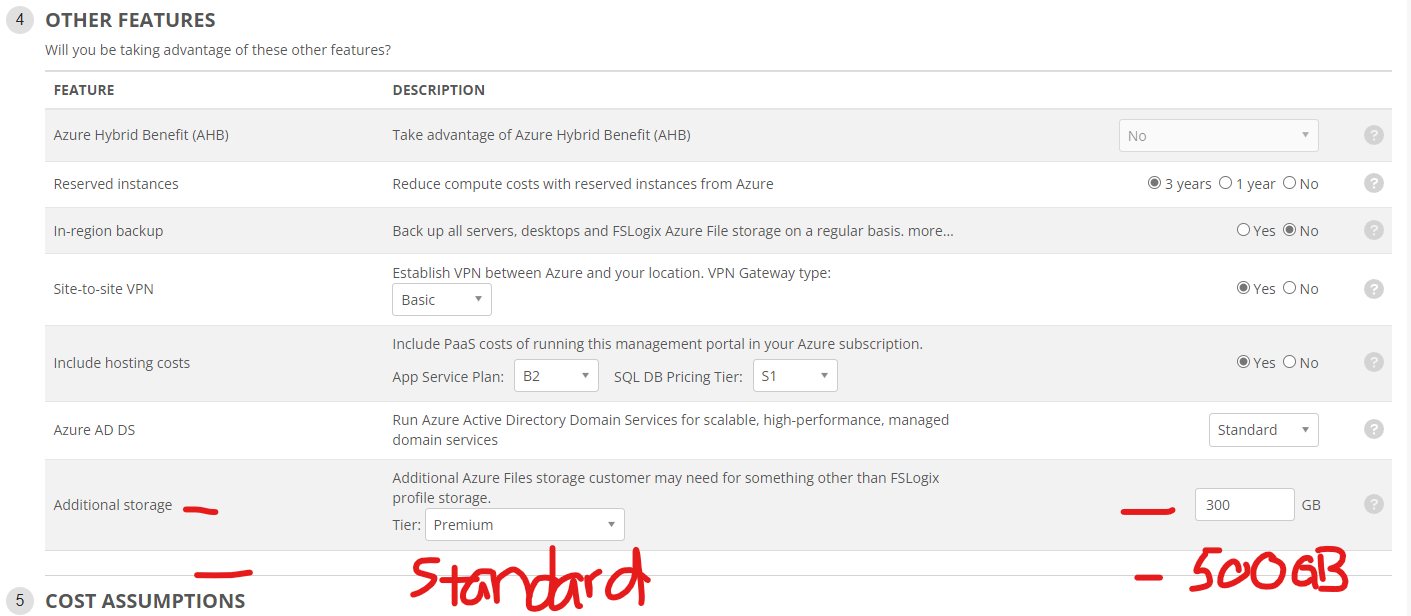
I just updated to NMM 3.6.0 to look at the new cost estimator features.  Looking at the "Additional Storage" field for Azure Files, is it possible to add another line for Azure Files to include Standard storage as well as Premium storage?  Or even multiple lines of Azure Files storage rather than just an overall total.

I have a few environments where im using Premium storage account for user data (profiles, ect..) and Standard storage account for files shares (mapped drive, app storage, ect..).  It would also be nice to highlight to customers what the cost of "High Performance" storage is over "Standard Performance" storage so when they come back and complain about things being "slow" we can point them to the cost of high performance.  


0
Avatar
Jason Bridgeman
Phil Long 

I just updated to NMM 3.6.0 to look at the new cost estimator features.  Looking at the "Additional Storage" field for Azure Files, is it possible to add another line for Azure Files to include Standard storage as well as Premium storage?  Or even multiple lines of Azure Files storage rather than just an overall total.

I have a few enviornments where im using Premium storage account for user data (profiles, ect..) and Standard storage account for files shares (mapped drive, app storage, ect..).  It would also be nice to highlight to customers what the cost of "High Performance" storage is over "Standard Performance" storage so when they come back and compalin about things being "slow" we can point them to the cost of high performance.  


I second this!
I use premium for all FSLogix and Hot data. We also give clients a Standard storage for storing Archived data.

0
Avatar
Amol Dalvi

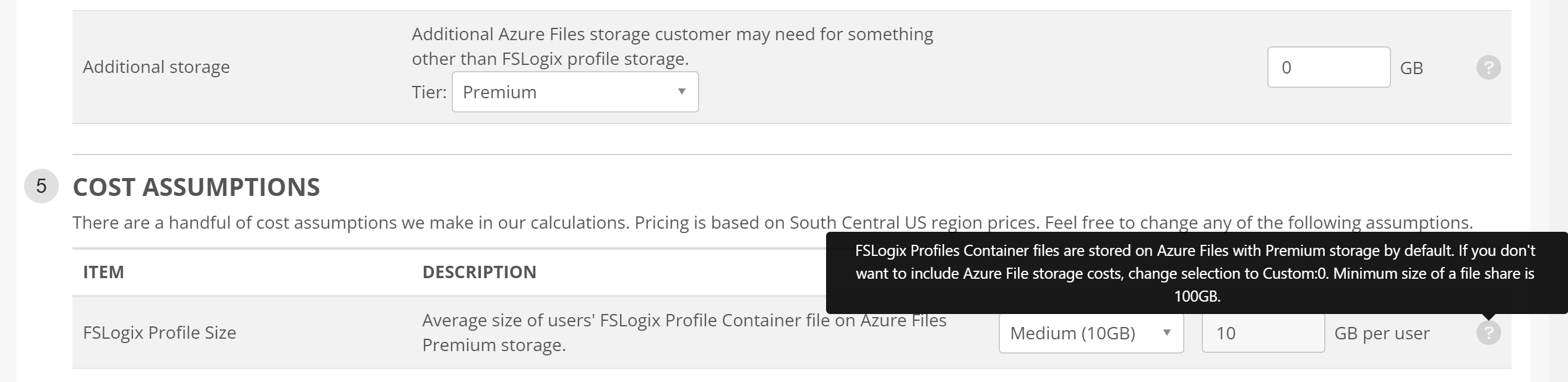
Hi Jason Bridgeman and Phil Long - I understand your request. I do want to clarify one thing though. There is a separate line for FSLogix storage costs. So, Additional Storage is storage in addition to FSLogix profile storage.

0
Avatar
DStephenson
(Edited )

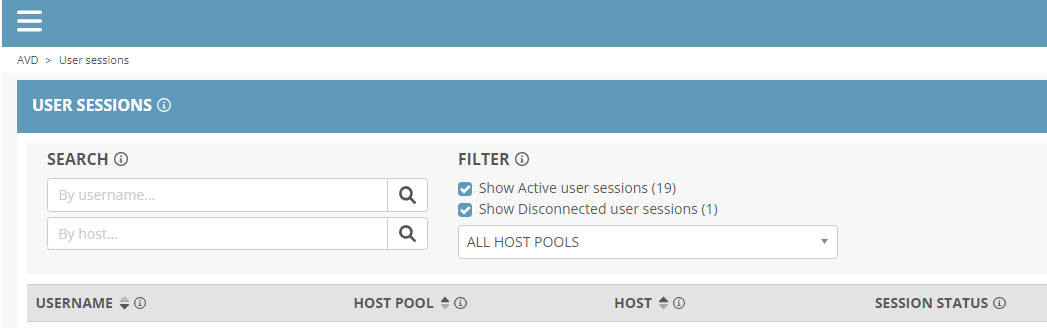
Forgive me if I missed a previous post, but I didn't see one about changing the sort of the User Sessions.
Currently, when you change the sort (click on the USERNAME, HOST POOL, or HOST columns), it just reverses the data that is being displayed.

It would be nice to be able to sort alphanumerically on those columns.

0
Avatar
DStephenson

We found a "gotchya" this morning when a user needed to wait ~15 minutes to log-in to their session because they were the 16th user and we're using "User-driven" Scaling Logic.

Per-support, we're working around this by adding additional pre-stage rules for around the time our second shift starts.

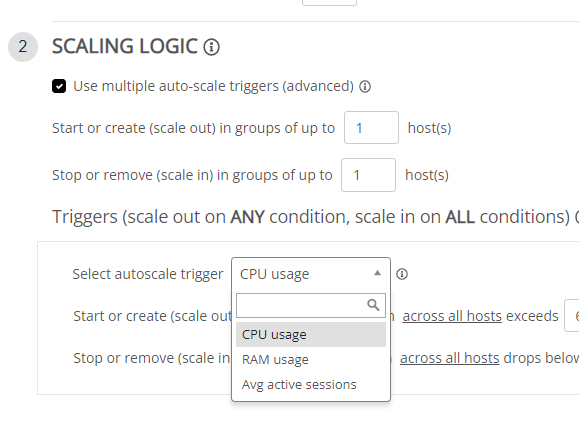
However, it would be great to be able to apply multiple scaling logic triggers to be able to scale-out a host when we get within 1-2 available sessions and still utilize the user-driven scale-in logic to shutdown the hosts when no one is logged-in for X minutes.
There is a similar feature available in NME that allows for multiple auto-scale triggers, but it doesn't appear to have the logic to do what we're wanting, at this time either.

0
Avatar
Jason Bridgeman

DStephenson I too have asked for multi scale logic on User-driven. I would like to also have an "Always X available user sessions" allowing the logic to start the next server BEFORE  there are 0 available session spots left. For larger clients with multiple hosts, we will always have a few users that have to wait that 5-15 minutes at login while it starts up the next host.

0
Avatar
Amol Dalvi

DStephenson - would the Available sessions auto-scale criteria be something that works better for you? You can use the field Maintain up to X available sessions and set scale-in aggressiveness to Medium or perhaps even Low. 

0
Avatar
Chuck Mikuzis

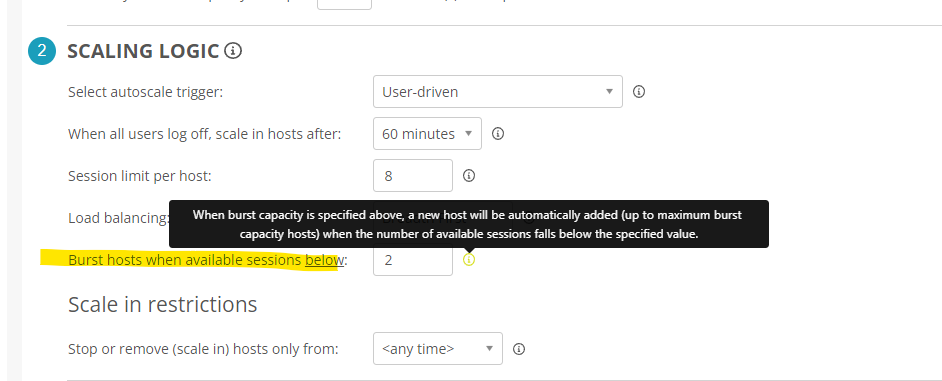
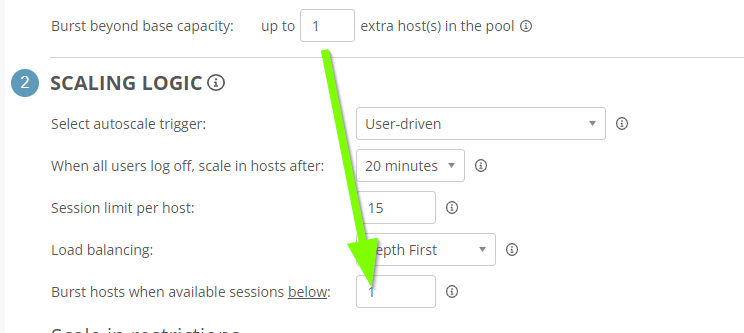
Jason Bridgeman and DStephenson   Bursting for user-driven auto-scale can be set to scale-out prior to dropping to 0 available sessions by editing this value here (default is 1):


In this example, if a single host were in the pool, a second host would be provisioned when the host reaches 7 sessions (less than 2 available).   As for multiple scaling logics, combining auto-scale logic will be available in v3.7.0, please see our release notes HERE

0
Avatar
Carl Long

Amol Dalvi and Myself will be discussing that feature in our monthly Webinar as well.  Please sign up Here

0
Avatar
DStephenson

Jason Bridgeman I'm glad we're not alone in the ask. 🙂

Amol Dalvi, we've tried the Available Sessions scaling logic, but it doesn't seem to work as well as the User-driven method.

Chuck Mikuzis, we're hesitant to use the burst method because usually we don't need more hosts that we have provisioned to a host pool.
When we get bigger clients who can utilize ephemeral disk/don't retain VMs, boost would be a great option. However, most of our clients are solidly in the S of SMB with less than 4 hosts.

Carl Long, LOVE the webinars! I checked out the release notes for v3.7.0 and it looks like the functionality is going to be the same as the NME version where we won't be able to combine User-driven with the "Always X available user sessions" like Jason was talking about.

0
Avatar
Jason Bridgeman

Chuck Mikuzis That is not even an option for me. Trust me, if that was there, I wouldn't have requested that. What version of NMM are you running? I am on 3.6.1

How do you get that option to show?

0
Avatar
DStephenson
(Edited )

Jason Bridgeman I didn't see it either until I changed the Burst beyond base capacity in the Host Pool Sizing section.

Post is closed for comments.