Tips And Tricks: Keeping your Image Current with Windows Updates Automatically

With NMM, you can combine scheduled imaging with Windows updates via a scripted action to keep your Image current with Windows updates. No more "who's turn is it to run updates?"  or "when was the last time we ran updates?"  on those images.  Here's what that can look like. 

Click Here to set an image:

 

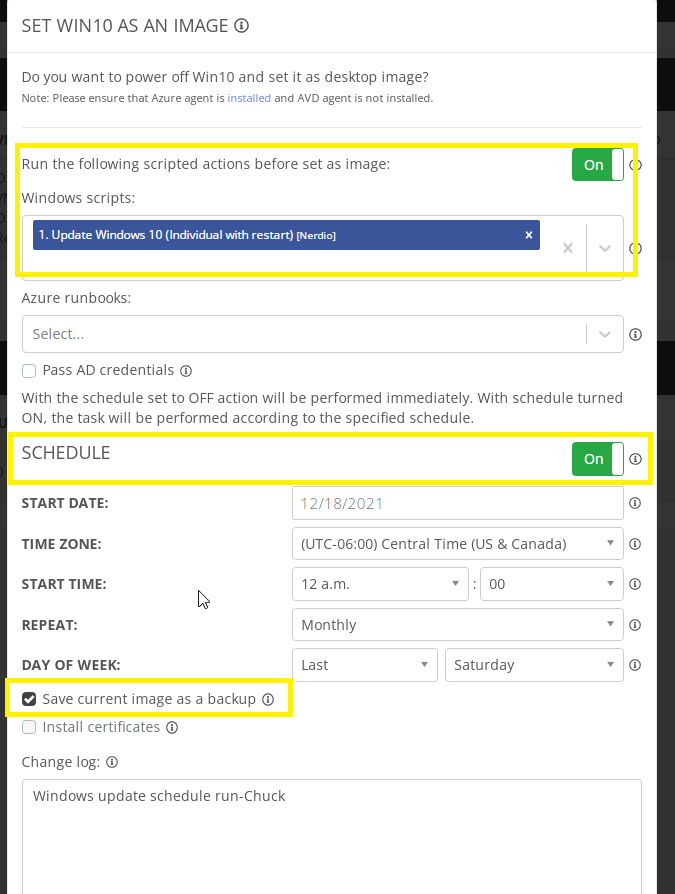
You can then set a schedule and even include scripted actions when setting that image.  You can see here I've added the Win10 update scripted action and set my schedule for a monthly image update.  I've also included a backup of the current image to be taken just in case those updates don't play nice:
 

Now you can have a lot less of this:

 

And more of:

 

For more info on desktop images in NMM and Scripted Actions, please see these links below:

Overview of Desktop Images

Scripted Actions-Windows

Chuck M

Solutions Support Manger here @ Nerdio


0

Comments (10 comments)

Avatar
Chuck Mikuzis
(Edited )

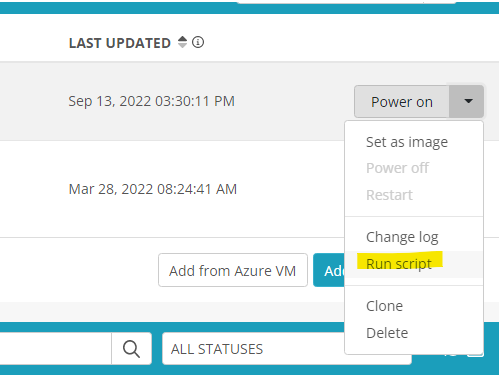
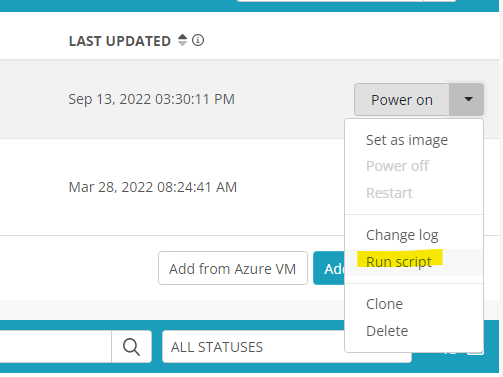
Brandon Rutledge this is possible, not via a schedule, but if you do need to run a script directly on the Desktop Image VM, you can via this option:


I'd be curious what your use case for running a script specifically on the temp VM would be.  Please provide some specifics and I can relay this to our product team.  

0
Avatar
Brandon Rutledge

It would be nice if there was an option to set the scripts to run on the source VM instead of the temp VM.

0
Avatar
Brandon Rutledge
(Edited )

I think you misunderstood. I can see in the logs that the scripts already do run on the temp VM. I would like the option to run Windows scripts on the source VM.

0
Avatar
Chuck Mikuzis

Brandon Rutledge you can use this option to run a script directly on the desktop image VM, this option would not run this on the temp VM:

0
Avatar
Brandon Rutledge

Unfortunately that does not help me. I need the scripts to run as part of a scheduled "Set as image" task.

0
Avatar
Andre Zanoncello

Chuck Mikuzis I think the problem is the article suggests that this will schedule scripts to run directly on the golden image however when you look at the logs and behavior of what this does the scripts are run on the temp VM which doesn't help to automate upgrading of the golden image. The article is a little misleading as the intended outcome of the title can't be achieved with the contents of the article. 

0
Avatar
Chuck Mikuzis

Andre Zanoncello I think there's some confusion on the resource definitions here.  The image resource is what would be updated here and not the Desktop Image VM.   During a "set as image" this following process occurs:

- Desktop Image VM (VM you see in Nerdio) is cloned

- Temp VM (Clone from Desktop Image) created

-Scripts run

- Temp VM is sysprepped

- Image resource is created from this temp VM

I did just recently cover this process in a sysprep overview during our monthly partner webinar:

August 2022 Partner Webinar

This process I've demoed in this post will update your IMAGE resource in the process.  Would a feature for scheduled scripted actions on the Desktop Image VM be something you would be looking for?   With this process above, you could essentially never run Windows updates on your Desktop Image VM but deploy AVD hosts with the updates installed.  This can sometimes be beneficial, giving you a Desktop Image VM without all updates installed in case there is a conflict with an update.  You wouldn't need to go through the process of a restore or uninstalling updates.   

0
Avatar
Brian Mock

Chuck Mikuzis I'm a bit confused after reading this post and the comments, so looking for clarification. It's stated "This process I've demoed in this post will update your IMAGE resource in the process". Is it a correct statement that if the steps in this post are followed, and the Windows Update scripted action is set to run monthly as a set as image, the Desktop Image VM (VM we see in Nerdio), would be updated in the process? Thanks

0
Avatar
Chuck Mikuzis

Brian Mock No, this process will not update the desktop image VM, this will update the IMAGE resource created in the process as the scripted action runs on the temp VM created in this process, which is the VM the image is created from.  In this process the following would occur:
- Desktop Image VM (VM visible in Nerdio) cloned

- Cloned VM (Temp VM) created

- Scripted Action run on Temp VM (updating windows)

- Temp VM sysprepped

- Image resource created from Temp VM


0
Avatar
Brian Mock
(Edited )

Chuck Mikuzis thank you, I think I have a clear understanding now. Prior to reading this article and comments, I was under the incorrect assumption that scheduling the scripted Windows Update action as outlined, was actually updating the Desktop Image VM. It would seem to me that over time, the Desktop Image VM will become more and more out of date, as it relates to OS patching (the same could be argued for MS Teams and Office).

For example, lets say we create a golden Desktop Image VM in January, and set a scheduled scripted Windows update action to run monthly. By the time December rolls around, that scheduled action will be running OS updates against a VM clone that hasn't been updated in almost a year. That's like pulling a computer out of the closet that hasn't been powered in a year and running Windows updates on it....the action becomes more error prone and less efficient as more time passes. In order to get around that (as I understand it today) would require a "manual" action on the MSP part to update the Desktop Image VM.

Additionally, this makes an issue where if a tech goes to add a client application to the base Desktop Image VM, for example, they are starting with an outdated OS image and must take the time (if they remember) to get the OS up to date as well.

As an MSP, that would not scale well for us and automation would be key here. I second Brandon Rutledge in that we need the ability to also schedule scripted actions against the Desktop Image VM. Please let me know if I'm misunderstanding anything.

Please sign in to leave a comment.