
In one of my organization's accounts, we have two single user desktop host pools (one with 137 hosts and one with 206 hosts).
We would like the ability to export lists showing the VM size each user has on their respective machine so that we can then better see costs/estimated costs per user (using the Azure Pricing Calculator). This in turn would allow us to better allocate costs to functional departments in my organization.
Report - Users' VM Sizes In Host Pool
0

Welcome to the community, Art Diaz 🙂!
That's a great suggestion.
As of right now, we don't have a way to export the currently configured VM sizes for a host pool.
We do have a couple of work arounds that may do what you're needing.
Estimated vs Deployed
We have our Estimated vs Deployed report that can compare an estimate to the currently running hosts to let you know where you're losing or making money based on your initial estimate.
API List of Devices
The other option, that I can think of, is to export the list of hosts from the Nerdio API and then you can manipulate it in whatever way you're wanting.
Would either of those options give you what you're needing?
Hi Dave,
The Estimated vs Deployed report isn't as granular as I need unfortunately. I'll try exporting the list of hosts from the Nerdio API to see if I can manipulate it. Still hope more granular reporting will be a possibility in the future. Thank you
Thanks for the feedback, Addiaz.
Additional reporting is one of those items we get asked about often.
Being able to report on this would be a great addition.
It's possible someone in the community might be able to help you out in the meantime with an API, GraphAPI, Azure PowerShell, or KQL query to get that information.
Unfortunately, I'm not one of those who can help because of my limited language skills. 😞
Hi again Dave Stephenson, regarding the above GET request from the Nerdio API, where would I find the "accountId"?
Great question, Art Diaz. 🙂
You can find the AccountID by running the GET /rest-api/v1/accounts API call, or you can see the Account ID at the MSP-Level of NMM by looking at the Accounts screen. (see screenshots below)
I'm not sure if we still have any seats available, but we do have one of our Advanced Training Camps coming-up next month where they're going to be covering "Building Next Level API Solutions" that may be a great resource to learn more about our API and how you can use it with your company's goals.
Hopefully it can fit into your schedule to be able to attend. 🙂
API
NMM Accounts Screen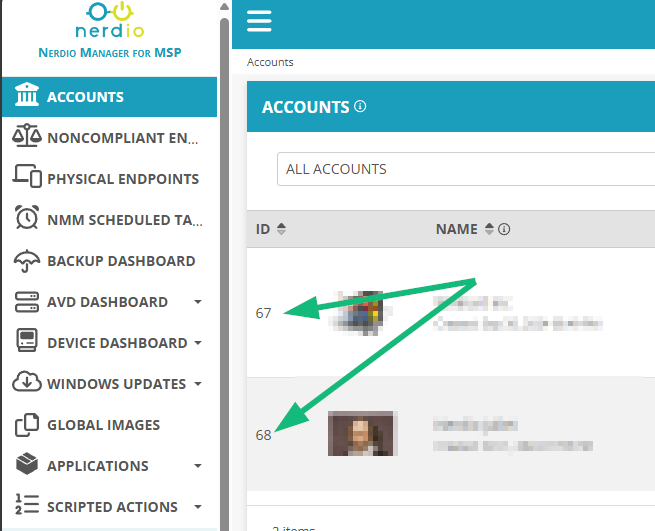
Please sign in to leave a comment.
Comments (5 comments)