Adobe Acrobat Pro DC installation

Acrobat Pro appears to license by user and it keeps track of the machine. Based on this, I suspect that the installation and activation will need to be done after the host pool is created and turned on.

Question about the license - does this also mean that I need to use an Acrobat Teams license instead of an Acrobat individual license?

1

Comments (6 comments)

1
Avatar
Stephen Yeoh

I've found the answer. Hope this helps others.

You can sign in using either a personal or Teams license. There is a 2-device limit and the host pool counts as one.

To install on the image:

Sign into Adobe, download installer.
Run installer.
Sign out of Adobe.
Reimage.

0
Avatar
Dylan Cote

I know this is an old thread, but has anyone gotten around the 2-device limit for users? For instance users who log in, then get placed on another host in a few days, and a new host the next day due to nightly sign outs.. then they receive the 2 device limit pop-up and have to choose a random host to sign-out of.


We are seeing it for some reason more often lately for users 


0
Avatar
Dave Stephenson

Dylan Cote, we've seen that a few times in Enhanced Support.
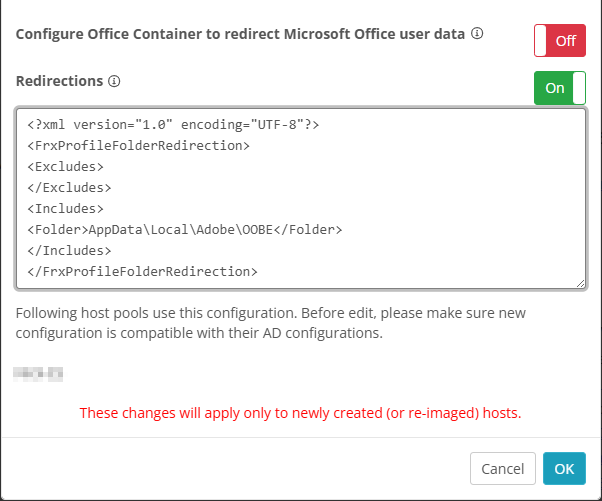
This Adobe article talks about the issue in more detail, but essentially you need to roam the Adobe licensing.

The easiest way to do this is with a Redirections file and include the “%LocalAppData%\Adobe\OOBE” path.
 

1
Avatar
Dylan Cote

Dave Stephenson  Thanks for that tip! I will test this out immediately. I appreciate the rapid response

0
Avatar
Ferrell Fuller

Good morning, Dylan!  Did this work for you? We have the exact same issue.  If it worked, we do not have the redirections turned on at the moment. When you turned them on and added the text from Dave Stevenson, did it blow anything else up?  Thanks!

0
Avatar
Dylan Cote

Hey Ferrell, looks like it hasn't been workign for us we tried local and roaming of that folder.. wondering if its the install switches with roamlicensing thats missing from our setup. 


Please sign in to leave a comment.