Group Policy user settings not applying consistently on AVD pool

Has anyone else run into this? On Windows 11 24H2 and 25H2 multi-session images, seeing user Group Policy settings not applying consistently. At this time, I'm seeing this on just a single host pool (and I've gone so far as to build a new pool in troubleshooting). I just moved hosts to a 25H2 image to see if anything would change, but on those hosts currently seeing only a 71.4% success rate on user policy applying successfully.

Haven't seen any issues with another pool in same domain. I haven't dug into whether this problem exists yet for the other pool, but problems from a missing GPO haven't come up yet.

Domain is existing on-prem domain, replicated over VPN to Azure to DC in Azure.

To get the info on success rate, I've got a logon script in local group policy on the session hosts so that it will still run when domain policy fails to apply that runs gpresults (5 times with a 3 minute delay between) and saves the output.

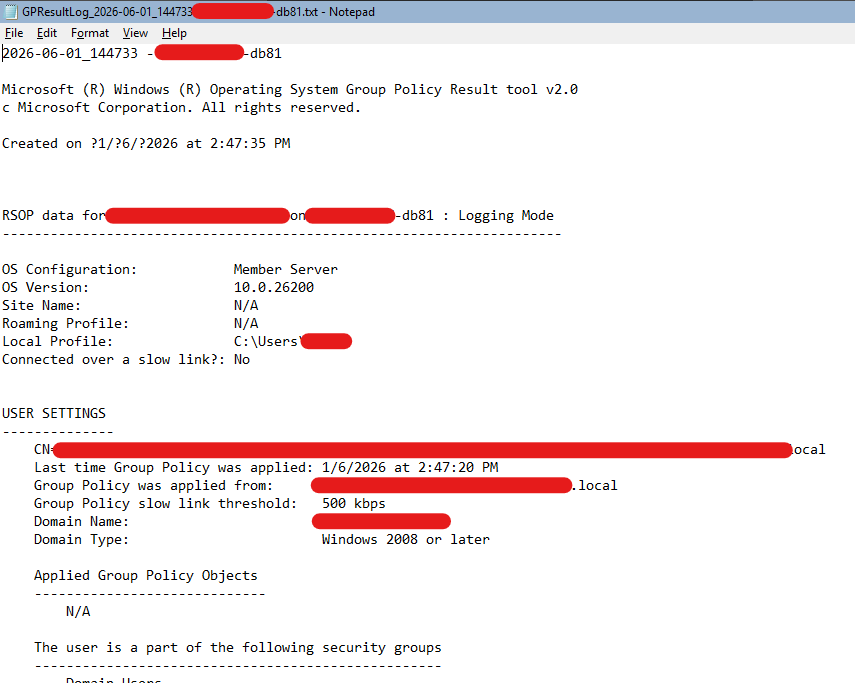
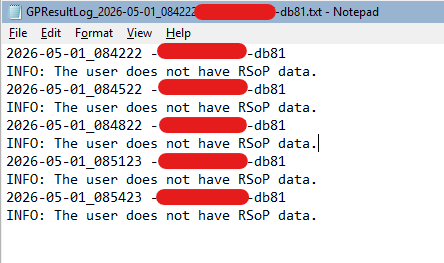
When it fails I see one of 2 outputs.

Output with no policies applied (N/A under Applied Group Policy Objects):
No RSOP data:
When successful, the Applied Group Policy Objects section is populated as expected.

I've picked up on no patterns of user, host, or time of day.

I've also noticed that there are not Group Policy 1503 events in System log for ongoing Group Policy refresh, only at logon.

There are no Group Policy errors logged on hosts.

The computer policies are applying consistently and I see regular refresh events for that.

0

Comments (6 comments)

0
Avatar
Michael Varian

We are having all sorts of issues and have been chasing debilitating problems on a new deployment for going on 5 weeks now.  We don't have objective data on success rate like you do, but very intermittent GP failures and other confusing/shifting symptoms have been plaguing us.  I'm wondering if we are experiencing the same thing in our environments.  Any interest in comparing notes?

0
Avatar
Gregory Barr

This is the script I'm running in local Group Policy as a user logon script to get the info on success rate. Nothing fancy and could have been shorter had I looped it, but it gets the job done. It would have saved some time if I had also scripted compiling all of the results, but I've just done that manually to this point. It wasn't too bad on a 4 host, 32-user pool.

function Get-TimeStamp {
    return "{0:yyy-dd-MM}_{0:HHmmss}" -f (Get-Date)
}

$ComputerName = $env:ComputerName
$UserProfilePath = $env:USERPROFILE
$LogFileFolder = "$UserProfilePath\GPResults"

If (!(Test-Path $LogFileFolder)){
   New-Item -Path $LogFileFolder -ItemType Directory
   }

$TimeStampValue = $(Get-TimeStamp)
$LogFile = $LogFileFolder + "\GPResultLog_" + $TimeStampValue + "-" + $ComputerName + ".txt"

Write-Output "$(Get-TimeStamp) - $env:ComputerName" | Out-file $LogFile 
cmd.exe /c "gpresult /r" | Out-file $LogFile -Append

Start-Sleep -Seconds 180

Write-Output "$(Get-TimeStamp) - $env:ComputerName" | Out-file $LogFile -Append
cmd.exe /c "gpresult /r" | Out-file $LogFile -Append

Start-Sleep -Seconds 180

Write-Output "$(Get-TimeStamp) - $env:ComputerName" | Out-file $LogFile -Append
cmd.exe /c "gpresult /r" | Out-file $LogFile -Append

Start-Sleep -Seconds 180

Write-Output "$(Get-TimeStamp) - $env:ComputerName" | Out-file $LogFile -Append
cmd.exe /c "gpresult /r" | Out-file $LogFile -Append

Start-Sleep -Seconds 180

Write-Output "$(Get-TimeStamp) - $env:ComputerName" | Out-file $LogFile -Append
cmd.exe /c "gpresult /r" | Out-file $LogFile -Append

Just this morning, I've setup the script on the other pool in this tenant that runs in another resource group to confirm whether the issue is happening domain-wide or not. I've moved the problem pool to a new subnet in the same vNet and resource group and have also built up a new pool, but nothing changed (except that hosts go to status “Needs assistance” less frequently, which was happening just in this pool). 

I've also reached out to Pax8 as the subscription is billed through them to ask if this in scope of what they can support.

0
Avatar
Gregory Barr

Now getting gpresult information from the other AVD session host pool in this AD DS domain and so far I see 100% success.

The differences between the 2 session host pools is pretty much the Azure resource group the VMs, vNet, and Azure Files sit in and the AD DS OU the users are in.

0
Avatar
Michael Varian

Been thinking about your reply - so you think it's some glitch with the resource group or something inside of it?  Would be curious to hear if you pin down any resolution on the problematic host pool.  We're currently building a new image on 25H2 + latest FSL release to see if that helps.

0
Avatar
Gregory Barr

I haven't thought of another reason that things would be so weird for just this pool (and still after having created a new pool) and just fine in another in the same domain besides the difference in resource group. The pool with the group policy issues was sitting in the same vNet subnet and resource group as the DC. I've moved the AVD hosts to another subnet in the same vNet over the course of this.

Before I go blowing things up, I am working with Pax8 support to see if a cause can be found. I got an update from them overnight saying they are seeing intermittent traffic to on-prem DC and to check AD Sites and Services. I already had the subnets assigned to sites.

0
Avatar
Gregory Barr

I didn't really see a resource bottleneck on DC VM in Azure, but it was a B2ms size. All it does is domain controller, DNS, and AD Connect. Just to try it out, I resized the VM to B4ms overnight and this morning I saw a 100% success rate on user policy application.

The thing that still doesn't make sense is why only 1 pool was impacted of the 2 served by this domain controller.

Please sign in to leave a comment.