
It would be helpful if Nerdio could add a feature that allows engineers to see AVD users access location and export it.
See users access location via Nerdio
4

Welcome to the community, Tunde Saka 🙂!
We had a few similar requests for what it seems like you're asking for (see Display users IP in User Sessions tab – Nerdio Help Center and AVD insights directly in NMM – Nerdio Help Center).
Are you by chance looking for the same thing or is your request slightly different?

I would love to have the user's source public IP address available. It would also be good for me if that information also went to host registry at HKEY_CURRENT_USER\Volatile Environment or was able to be recorded in one of the TerminalServices event logs.
I've been thinking about building a logging utility to record times of logons, logoffs, disconnects, and reconnects to document when a user was on, what host they were on, and where they logged on from.
I've got a PowerShell script already that reads the Microsoft-Windows-TerminalServices-LocalSessionManager/Operational log from a list of hosts and can put together a list of logon and logoff times for a given user, but that information is lost after a re-image.
I'm wanting the logging because of all of the times an issue is reported like, “It was slow yesterday”. Ok, which host was that?
Yes, this is the feature am referring to. We would like to find out where most people are logging in from, like their location (it would help to also have like a heat map)
This is for one of our big customers so it would be helpful if we can have this feature added.
Tunde
Tunde Saka This is the script to pull logon and logoff times that I've got. Just a couple of variables to set at the top and the Windows firewall needs to allow inbound traffic to read event logs.
$NetBiosDomain = "DOMAIN"

$Servers = "SERVER01", "SERVER02", "SERVER03"

$UserName = Read-Host -Prompt "Enter username"

$SearchPeriodInput = Read-Host -Prompt "Enter time period to check for:`n1 - Today`n2 - Yesterday (and today)`n3 - Last 7 days (and today)`nA - All available events`nEnter Selection"

$ServerEventList = @()
$AllLogonEventList = @()
$AllLogoffEventList = @()
$AllEventList = @()

# This block adds 2 lines with blank data to events to resolve issues with reading array with single entry
$LogonEvent = new-object psobject
$LogonEvent | Add-Member -MemberType noteproperty -Name "Logon Event Time" -Value 0
$LogonEvent | Add-Member -MemberType noteproperty -Name "Server" -Value "------"
$AllLogonEventList += $LogonEvent
$LogoffEvent = new-object psobject
$LogoffEvent | Add-Member -MemberType noteproperty -Name "Logoff Event Time" -Value 0
$LogoffEvent | Add-Member -MemberType noteproperty -Name "Server" -Value "-----"
$AllLogoffEventList += $LogoffEvent
$LogonEvent = new-object psobject
$LogonEvent | Add-Member -MemberType noteproperty -Name "Logon Event Time" -Value 0
$LogonEvent | Add-Member -MemberType noteproperty -Name "Server" -Value "------"
$AllLogonEventList += $LogonEvent
$LogoffEvent = new-object psobject
$LogoffEvent | Add-Member -MemberType noteproperty -Name "Logoff Event Time" -Value 0
$LogoffEvent | Add-Member -MemberType noteproperty -Name "Server" -Value "-----"
$AllLogoffEventList += $LogoffEvent

while ($SearchPeriodInput -ne "1" -And $SearchPeriodInput -ne "2" -And $SearchPeriodInput -ne "3" -And $SearchPeriodInput -ne "A"){
   cls
   $SearchPeriodInput = Read-Host -Prompt "`nYou have made an invalid selection!`nEnter time period to check for:`n1 - Today`n2 - Yesterday (and today)`n3 - Last 7 days (and today)`nA - All available events`nEnter Selection"
}

If ($SearchPeriodInput -eq "1"){$SearchPeriod = (get-date -hour 0 -minute 0 -second 0)}
If ($SearchPeriodInput -eq "2"){$SearchPeriod = (get-date -hour 0 -minute 0 -second 0) - (new-timespan -day 1)}
If ($SearchPeriodInput -eq "3"){$SearchPeriod = (get-date -hour 0 -minute 0 -second 0) - (new-timespan -day 8)}
If ($SearchPeriodInput -eq "A"){$SearchPeriod = 0}


ForEach ($Server in $Servers){
   #write-host "Starting check on $Server"
   $ServerEventList = get-winevent -ComputerName $Server -LogName Microsoft-Windows-TerminalServices-LocalSessionManager/Operational | where{$_.timecreated -ge $SearchPeriod} | where{($_.Id -like "21") -OR ($_.Id -like "23")} | where {$_.message -like "*$NetBiosDomain\$Username*"} | select TimeCreated, Id, Message

   ForEach ($Event in $ServerEventList){
      If ($Event.Id -like "21"){
         $LogonEvent = new-object psobject
         $LogonEvent | Add-Member -MemberType noteproperty -Name "Logon Event Time" -Value $Event.TimeCreated
         $LogonEvent | Add-Member -MemberType noteproperty -Name "Server" -Value $Server
         $AllLogonEventList += $LogonEvent
      }
   }
   ForEach ($Event in $ServerEventList){
	  If ($Event.Id -like "23"){
	     $LogoffEvent = new-object psobject
         $LogoffEvent | Add-Member -MemberType noteproperty -Name "Logoff Event Time" -Value $Event.TimeCreated
         $LogoffEvent | Add-Member -MemberType noteproperty -Name "Server" -Value $Server
         $AllLogoffEventList += $LogoffEvent
      }
   }
   #write-host "Ending check on $Server"
}

$AllLogonEventList = $AllLogonEventList | Sort-Object "Logon Event Time"
$AllLogoffEventList = $AllLogoffEventList | Sort-Object "Logoff Event Time"

For ($i = 2; $i -lt ($AllLogonEventList).count; $i++){
   $CombinedList = new-object psobject
   $CombinedList | Add-Member -MemberType NoteProperty -Name "Logon Event Time" -Value ($AllLogonEventList[$i])."Logon Event Time"
   $CombinedList | Add-Member -MemberType NoteProperty -Name "Logoff Event Time" -Value ($AllLogoffEventList[$i])."Logoff Event Time"
   $CombinedList | Add-Member -MemberType NoteProperty -Name "Server" -Value ($AllLogonEventList[$i]).Server
   $AllEventList += $CombinedList
}

$AllEventList | ft -autosize -wrap

<#
Write-Host "Press any key to exit ..."

$x = $host.UI.RawUI.ReadKey("NoEcho,IncludeKeyDown")
#>
Very cool, Gregory!
Thanks for sharing. 😎

Gregory,
I really like what you are doing here - but for a feature suggestion, I would think this steps a bit out of the box. In the MSP space, wouldn't we want to avoid custom scripting in each customers environment? While it has its place, for sure, and I have one particular customer where we've enabled a similar solution, I would prefer this data at least for AVD Session Hosts, to be available in the NMM Console, at minimum in a runnable report.
For this topic in general I would ask if we can get NMM to at least have a report option that would go read Insights data for users source logon ip's and timestamps for the login. In theory it could be grabbed from Entra ID signin logs, but this could be confusing since a users connects to AVD from one IP (The actual source) - then authenticates office apps from the session host (not really the source, so to speak). The report I am proposing would likely have a good chunk of data to it, but when exported to CSV could be twisted and turned to meet the need.
I'm trying to highlight the value of this data to a support or escalation engineer trying to troubleshoot a user issue. The more data we put at their fingertips (e.g. the NMM UI) - the easier it is for them to identify a scenario such as “your ip changed dramatically, did you switch internet providers? are you travelling? could your office internet have failed over to a lesser provider?”
I can see value during onboarding/setup as well. Mr Customer, you indicated your users were all in Texas, but these 5 users here are logging in from Switzerland and complaining about latency. Lets find a better solution.
Bonus points? That heat Map idea the OP, Tunde, proposed. While I recognize that is probably a bit much for the NMM UI, I would contend that if we can this data into the UI, then lets make sure there is an API function for it. We use PowerBI extensively, and if I can query the users locations via API, this would be a most excellent mapping and other visualization capability we could extend with your visilization tool of choice.
Great points, John!
While Gregory's script is a custom one (right now) you could swap-in variables pretty easily to make it dynamic/scalable to the other accounts. However, long term, we will need/want something in the UI.
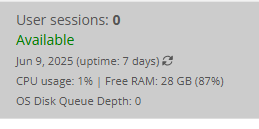
As long as it's not refreshing multiple times a minute, the heatmap idea could work (similar to how we display the host VM Performance).
We'll have to see what our Product Team can come up with.
Who knows? Maybe there is something with the new UI changes that can be leveraged here?
Keep the ideas coming! 😎
My script above is not really a suggested fix, as it doesn't provide the location, just my current workaround to at least get timestamps of logon and logoff as well as the AVD host they were signed into. If those items + location were available in NMM that would make my day.
Not knowing any timeline of features, I've been thinking of setting up something similar to what I've already got, but SQL-based with the hosts sending off log data as currently it's just reading logs on the hosts, which are lost with a re-image.
So far, I've only been able to find the source IP address in Azure, in Monitoring > Insights on the host pool, then Connection Performance.
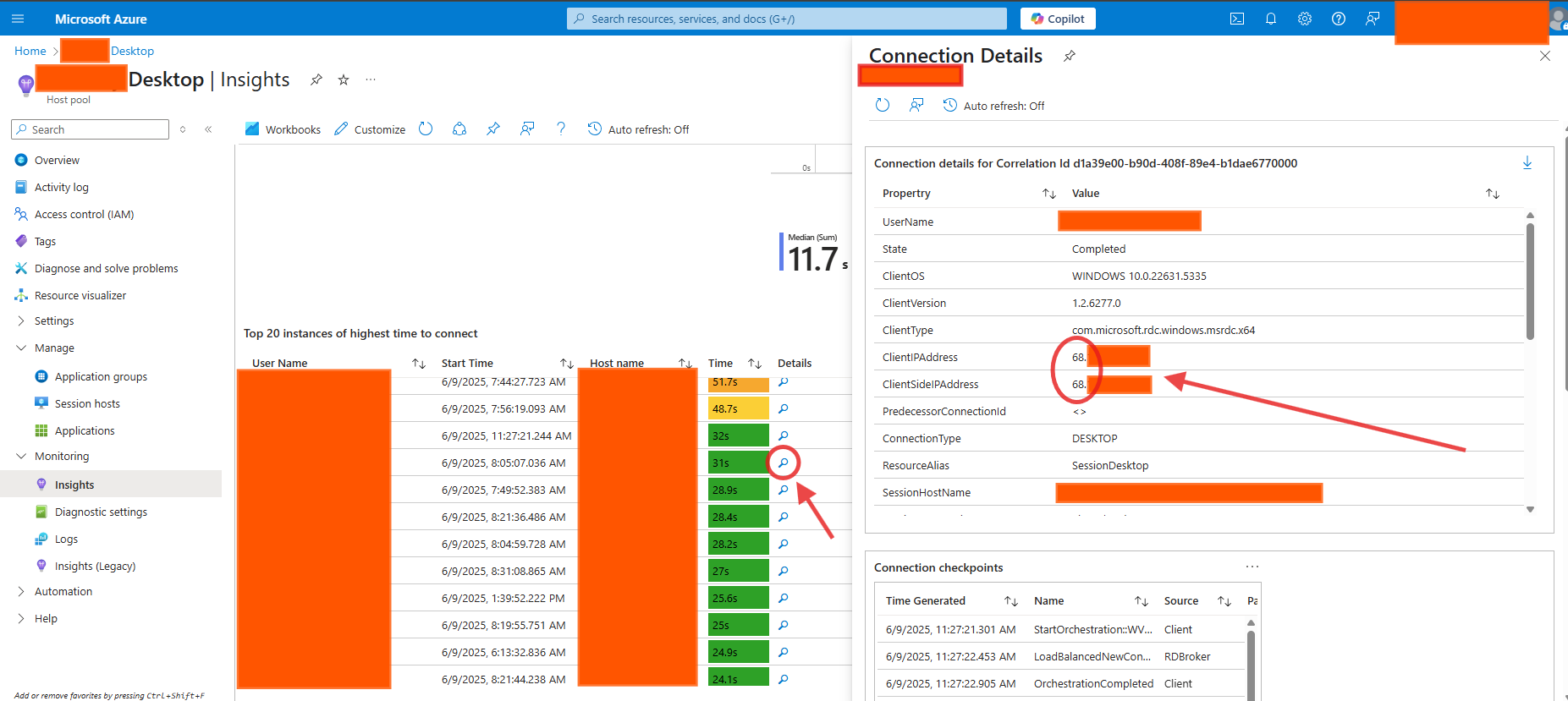
This tells me the data is there, I just don't have the skill set to get to it another way since I've been unable to find it being recorded in RDS logs on hosts.
Hi
Gregory Barr thanks for sharing appreciate it.
Dave Stephenson would it also be possible for the requested feature to also be applied to NME portal?
Great idea, Tunde!
Our two product teams (NMM and NME) often collaborate together on the features that are released so I'm guessing this will be on the NME radar pretty quickly.
However, if you want to add the idea to their feature request page, it wouldn't hurt. 🙂
Please sign in to leave a comment.
Comments (12 comments)