NAT Gateway requirement after 09/30/25

Good morning all, 
I see the requirement to have a NAT Gateway configured post 09/30/2025 this year for all new machines. Configuring it via Nerdio is SUPER Easy HERE

My question here is, does anyone know if you will need to configure any different inbound rules or resources to keep AVD working? currently we use the workplace connection of https://rdweb.wvd.microsoft.com and it works great for users. See if it is simply we must configure for outbound from Azure or there will be an inbound resource like a load balancer needed as well?

0

Comments (3 comments)

0
Avatar
Dave Stephenson

Great question, Johnny!

Microsoft is making that change (see Default outbound access for VMs in Azure will be retired), but luckily it only impacts outbound internet access. You won't need to make any changes for inbound access.
If you don't implement a NAT Gateway (or another supported method) before September 30th, your users will still be able to login to AVD without any additional changes. 

The one sticking point is they won't be able to browse the internet or check emails without a NAT Gateway (or other supported method). 

Does that clear-up your question or did I just make it more confusing?

0
Avatar
Johnny Lambert

Yup. I was guessing that much.

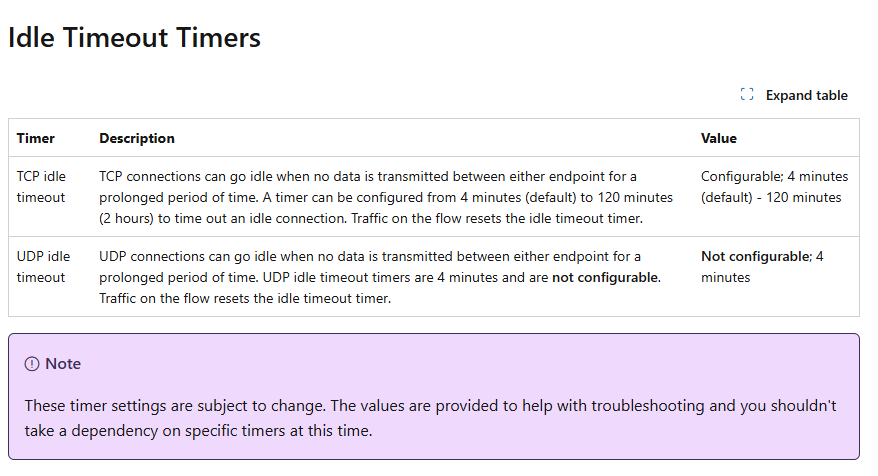
One last question. The timeout feature, if we set it for, let's say 30 minutes. 
Let's say viua the host pool properties we have “Disconnect Idle sessions after 1 hour”. Will the 30 minutes trigger a discconet or log out, or will it simply stop outbound internet without disconnecting the host session?

0
Avatar
Dave Stephenson

They're actually two separate things.
The NAT Gateway timeout is for the AVD host talking to the internet, but the AVD Host Pool timeout is more about the user's connection to the AVD Host Pool.

If you look at Microsoft's NAT Gateway documentation, it looks like as long as the user is actively doing something (i.e. on a Teams call, downloading a file, etc.), it won't disconnect their connection to the internet.
However, if they go idle, it will disconnect their internet and reconnect them once they're no longer idle. 

At least, that's how I interpret it. It's possible someone else may have other insights that they can share.

Please sign in to leave a comment.