
It would be helpful if NMM had a native FSLogix profile purger with specific thresholds we could define. For example, days since last modified, skip enabled accounts, etc. Maybe a Nerdio hardcoded one that the feature is only available on shares with active backups configured. Previously, we were leaving the FSLogix profiles indefinitely as we did not have an easy way to manage/automate this process. Now, we are using an Azure runbook within NMM to find and purge all FSLogix profiles not modified in the last 90 days where the account is not enabled (so deleted or disabled accounts only). A feature like this could help with data retention policies. We have some clients that purge data after X number of years. It would also help with cost savings. We had one tenant where we purged enough data to see a monthly savings of $2,000.
FSLogix Profile Purger

Loving this!
We have the individual user profile clean-up as part of the user archive feature, but if someone forgets to do it from within Nerdio or forgets to check the box, you're kind of out of luck.
We also have a scripted action (Azure Runbook) that can be used to clean-up a storage account, but it needs to do it one file share at a time and (currently) requires you to have the Storage Key stored as a secure variable.
Having something built-in to the backup process like Chris mentioned would be ideal so that the only way to do the automated clean-up would be if a backup policy is configured/enabled.
But that's just me thinking out-loud.
Does anyone else have a different use-case where they wouldn't want the clean-up to be tied to the backup?
Backup/Cleanup (Mock-up)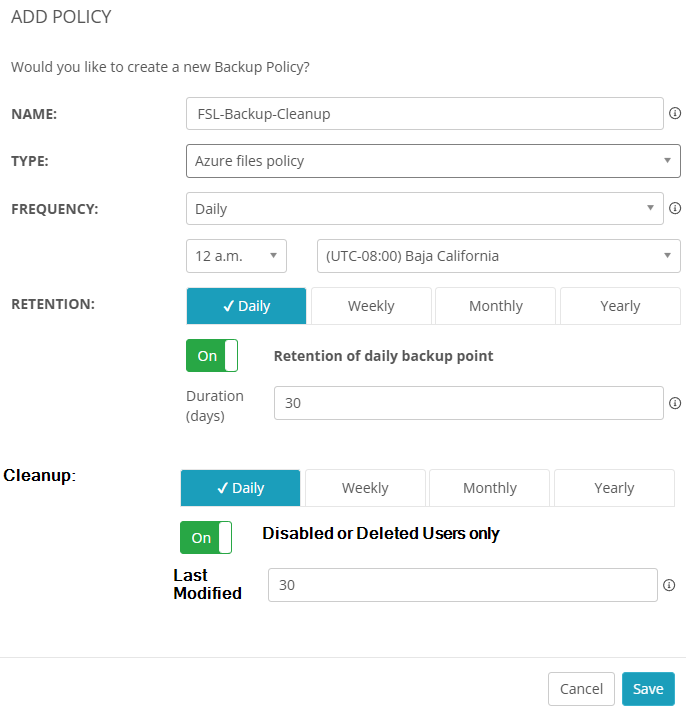
User Archive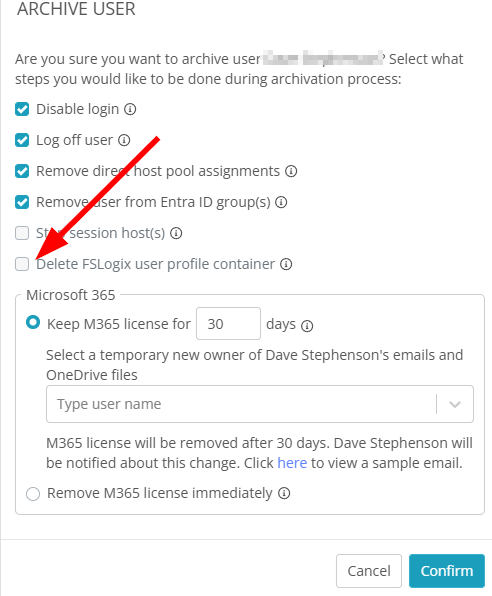
Please sign in to leave a comment.
Comments (1 comment)