
When overriding an inherited variable, you have to go into each tenant's integrations page to override it for that tenant. It would be very helpful if you could set the override for multiple tenants from the main integrations page, instead of having to do it one-by-one for each tenant.
Add ability to change inherited variable for tenants from main integrations page
1

Welcome to the community, Ryan Neighbors 🙂!
I like the idea, in theory, but the practicality may be a bit difficult.
Right now, where you go into each Account to override the variable, it keeps everything clean and it makes it a bit easier to make sure you're not overriding the wrong variable.
If you only have a few customer accounts/variables, it wouldn't be too bad to manage them from one screen.
But, once you get more than 5 accounts, it could quickly become unwieldly with all of the accounts/options.
However, we could probably do something like a wizard/table where you could choose an Inherited Variable and click a button to open a wizard to set the value(s)?
If you had to choose one option (see below), which would be best for your used case?
All Variables/Companies on one screen/wizard
All Companies (per Variable) on one screen/wizard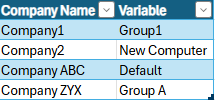
Use case would be something like: I add a new variable. Then, I select to edit the variable for all companies. The UI for editing the variable could even be as simple in design as a simple table where I can quickly edit the variable for all companies. This would save so much time. If we have 20 companies, it takes even LONGER to go into each one, go into the integrations, click to override, input the value, and save. Something like this would be good: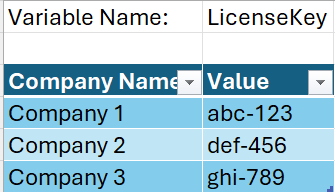
I like it!
We could just utilize the same basic structure and make it look something like this (in a pop-up sub-menu)
That way, the MSP specified variable is there, but we could override or reset it to default quickly and easily.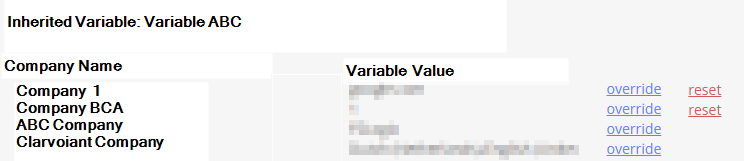
Here is another similar idea that would benefit from this feature request.
Ability to globally view all account level variable overrides – Nerdio Help Center
Please sign in to leave a comment.
Comments (4 comments)