
The existing notification actions are Email Notification and Custom API Notification. I would love the ability to trigger an NMM Azure Runbook script with the same body that the Custom API option ships. Leaving it in a JSON format is fine, too. This would allow us to natively build out automation for specific conditions within NMM instead of triggering a third-party automation solution when I have what I need right in NMM :).
Notification Action - Azure Runbook Option
0

We're definitely getting into the "Inception" realm of automation with this idea! 🤣
In theory, you could use the NMM API to trigger the scripted action (runbook) to run on the trigger, but your idea sounds much simpler. 🙂
Just to help some other partners get their creative juices flowing, what kind of notification + automation are you thinking of implementing, Chris Brannon?
(i.e. Failed backup = Scripted Action to run healthchecks on the VM, Successful Reimage = Azure Automation to release a treat to all of your T1 techs, etc. )
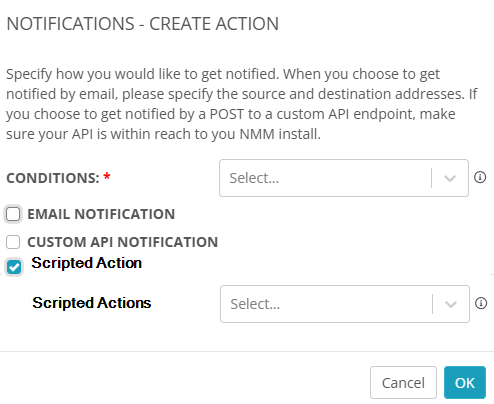
Yes, technically, I could build an Azure Automation account with a webbook attached to a runbook, but then I would be outside of NMM. I imagine more and more triggers will be added to the notification conditions, which talk about "Inception" :).
But yea, you hit the nail on the head:
- Backup fails: Open a ticket in my PSA, trigger a manual backup, wait for the status, update the PSA ticket, and close if it is successful.
- Intune devices fall into the in-grace period: open a PSA ticket and trigger a sync.
- Assign user to session host: Send email with instructions on how to connect to AVD.
The list goes on, but it would be nice to be able to run a script right from the alert action wizard.
Thanks, Chris!
I like those example use-cases you mentioned. They're common and relatable to other MSPs.
Like you said, there are many more ways you can use with this (and I'm sure every partner has another 50+ they could suggest too 🙂)!
Please sign in to leave a comment.
Comments (3 comments)