Azure Capacity Extender Improvements (Planned)

Instead of showing every VM size in the dropdown by default, maybe it would make more sense to only show VM sizes that are somewhat comparable in size/cost.

Or have a filter/checkbox that allows you to sort out any VMs that are not similar in size and/or cost.
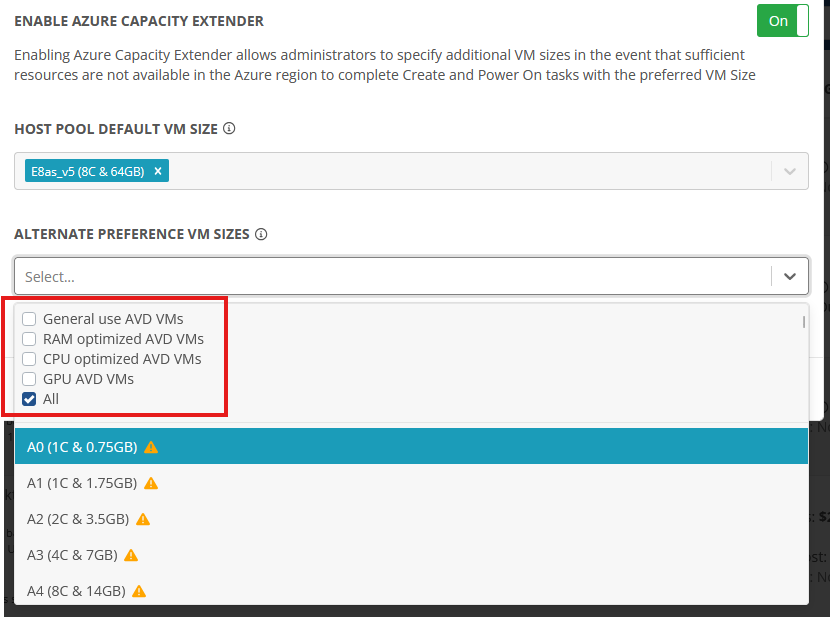
Also is there an option for the Nerdio Manager Host Pool Properties to show you what sizes the Azure Intelligent Capcity Extender will plan to use based on your default VM size?

There is no information in the documentation on how this feature selects the alternative sizes so I'm not sure I understand the logic behind it:

1

Comments (1 comment)

0
Avatar
Dave Stephenson

Great idea!
Being able to add filtering would make it a bit easier to choose the corresponding SKUs you want to utilize in the Azure Capacity Extender.

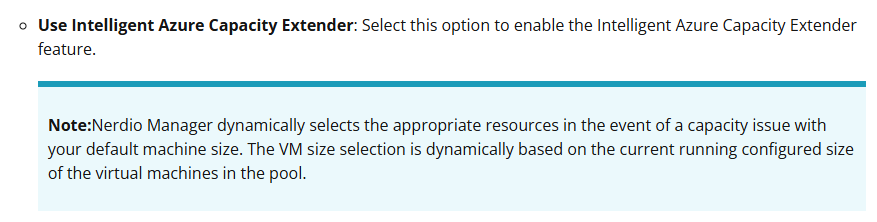
You're also correct on the Intelligent Azure Capacity Extender where we currently have limited documentation on the feature (see the screenshot below from our doucmentation).
If you turn it on, you can see the logic it tries to do in selecting an alternate VM SKU. However, at a high-level it will go through every similar SKU (to the one you have selected in the AutoScale settings) until it can find one that boots.
One current limitation with this is it also tries ARM-based SKUs as well and it's unlikely that your image will work with an ARM SKU.
We recommend explicitly specifying the SKUs you want it to try in the Azure Capacity Extender to help get your hosts online as quickly as possible in the event that your preferred SKU is unavailable.

Please sign in to leave a comment.