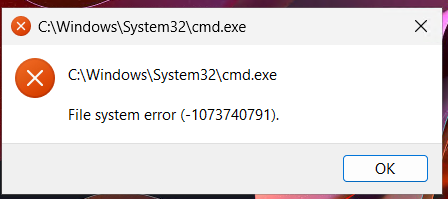
UAC issues on Windows 11 24H2

I spent hours trying to research and solve this issue I'm having, so just curious if anyone else is experiencing this. My template was on Windows 11 23H2 and I was able to update the image to 24H2. After the update I found that any hosts I spun up would have issues opening any UAC prompt. I get “File system error (-1073740791)” after the UAC prompt tries to open. When I open powershell and try to elevate it within powershell, I get this “0xc0000409”

I thought that the issue might be a result of my inplace upgrade. So I built a new Template from the Azure Marketplace via Nerdio Nmm using version 24H2. The same issue is still happening - on a clean build. Any ideas would be appreciated. 

2

Comments (5 comments)

0
Avatar
John Tokash

Julian,

Welcome!   At first, I was going to advise that Microsoft flatly does not support the in place upgrade on multi-session hosts/images, and although some have made it work, it was quite the effort and still seemed to have issues.    That said, if you are seeing the issue on a fresh marketplace 24H2, it is a bit more perplexing.   I am

I cannot say I've encountered the issue before, but I can poke around in my lab and see if I can reproduce it.  I don't find myself having to authenticate through it frequently, but I have two customers that come to mind where we do (as a support function) have to authenticate as an admin for certain support activities occasionally.   I know it has worked in the past, so I'm wondering if it isn't a product of a more recent update?

I would definitely run this by Nerdio Support.   If other partners have reported the issue through support, they would know. 

Is there a specific task or function that is generic that you could provide for reproduction?   If so, I'd be happy to validate it.  Otherwise I'll just try and open an elevated Powershell and report back if it works after entering credentials.   Am I understanding this correctly, the dialog box doesn't open at all for you to enter the credentials - that is where the issue occurs? or is it after entering credentials?

0
Avatar
julian.neufeld

Thanks for the reply, John.
I currently have a ticket open with Nerdio Support, but the issue still hasn’t been resolved.

Our client uses accounting software that requires admin elevation on first launch, and with new users starting periodically, this is becoming a growing problem. When I attempt to run any application as an administrator, the screen goes blank and instead of displaying the UAC prompt, it shows the error. The dialog box where I can enter my creds does not appear. I can try this on any app, Chrome, Edge and I will get the same error code. 

0
Avatar
John Tokash

I can't reproduce it, I tried on two different pools and prompts just fine.

Google-foo seems to indicate the first place to start is traditional corruption checks like sfc /scannow and dism - but without being able to launch an admin console, that may struggle.   You could try to use a scheduled task or scripted action to run those checks as localsystem, but I've never tried myself. 

That said, unless Nerdio Support has a better pointer, I would try to break the problem down.   Deploy a VM with the image and test (no domain join, just standalone) - then join it to the domain and let policy apply, retest, etc.   See where it stops working.   If it doesn't work from a vanilla marketplace image with no domain join or hybrid connectivity, then you have a Microsoft case on your hands.

Good luck - I'm curious how you make out. 

0
Avatar
julian.neufeld

Hey John,

Thanks for your reply and tests you ran to try and help me. I did many tests - no domain join, standalone and other things as suggested but none seemed to have resolved my issue. After again more researching and troubleshooting I was finally able to resolve the issue. I had to run 3 powershell commands on the hosts to restore UAC prompt functionality. I have now configured my pool to run the script when a new host deploys so my issue is resolved. Thanks for your help.

KB5072911: Multiple symptoms occur after provisioning a PC with a Windows 11, version 24H2 update - Microsoft Support

1
Avatar
Daniel Lundqvist

Julian,

“you are not alone….”. We have been fighting with the same UAC issue during some months, spend many hours with different configurations. Unfortunately for us, this bug (July update) was applied to one of our Global Images and caused some issues to customer deployments during the whole autumn. During the last days, we have seen the error go away on some VMs, without knowing why. Which made it even more confusing. But now, having read this note and found M$ KB about the problem, I can finally see a hope of the future 😊.

Thanks Julian!

Please sign in to leave a comment.