
Whilst working with a partner during a go-live, they asked if JSON files could be inserted into variables for tasks such as configuring browser favourites or pinning applications to the task bar via intune configuration profiles.
On further investigation, this is not currently possible via Nerdio Manager. For a variable to be processed in Nerdio, it requires to be inserted in a specific format (see below). The following is the JSON format for an Intune configuration profile that configures Chrome or Edge Favourites.
Original JSON
{
"toplevel_name": "Company Bookmarks",
"children": [
{
"name": "Microsoft Learn",
"url": "https://learn.microsoft.com"
},
{
"name": "GitHub",
"url": "https://github.com"
},
{
"name": "Tech Community",
"url": "https://techcommunity.microsoft.com"
},
{
"name": "Productivity Tools",
"children": [
{
"name": "Trello",
"url": "https://trello.com"
},
{
"name": "Notion",
"url": "https://www.notion.so"
},
{
"name": "Asana",
"url": "https://asana.com"
}
]
},
{
"name": "News & Research",
"children": [
{
"name": "BBC News",
"url": "https://www.bbc.com/news"
},
{
"name": "National Geographic",
"url": "https://www.nationalgeographic.com"
},
{
"name": "Reuters",
"url": "https://www.reuters.com"
}
]
},
{
"name": "Cloud Portals",
"children": [
{
"name": "Azure Portal",
"url": "https://portal.azure.com"
},
{
"name": "Microsoft 365 Admin Center",
"url": "https://admin.microsoft.com"
},
{
"name": "Intune Admin Center",
"url": "https://intune.microsoft.com"
}
]
}
]
}
Formatted JSON
"{"name":null,"children":[{"url":"https://learn.microsoft.com","name":"Microsoft Learn"},{"url":"https://github.com","name":"GitHub"},{"url":"https://techcommunity.microsoft.com","name":"Tech Community"},{"name":"Productivity Tools","children":[{"url":"https://trello.com","name":"Trello"},{"url":"https://www.notion.so","name":"Notion"},{"url":"https://asana.com","name":"Asana"}]},{"name":"News & Research","children":[{"url":"https://www.bbc.com/news","name":"BBC News"},{"url":"https://www.nationalgeographic.com","name":"National Geographic"},{"url":"https://www.reuters.com","name":"Reuters"}]},{"name":"Cloud Portals","children":[{"url":"https://portal.azure.com","name":"Azure Portal"},{"url":"https://admin.microsoft.com","name":"Microsoft 365 Admin Center"},{"url":"https://intune.microsoft.com","name":"Intune Admin Center"}]}]}"
If the original format is used, Nerdio manager will not allow the variable to be used in a policy and the following error will generate when publishing the policy.
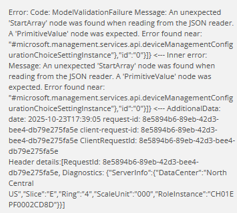
If the formatted variable above is used, Nerdio manager can apply the variable to the policy but the starting and closing " invalidate the JSON format and the intune configuration will not apply to the end point.
Having Nerdio manager automatically detect a JSON file and apply the correct format would be great. In having this feature, MSPs can place JSONs within Nerdio Manager and then take advantage of the benefits that variables give such as easy visibility and override on an a per account basis.


Comments (2 comments)