Enable Azure Runbooks for purely Modern Work customers

Enable us to run Azure Runbooks for Modern Work customers as well - then we can use the Nerdio application context to configure other parts of Modern Work that the UI is not ready for yet

Case: I want to automate the tedious process of uploading Defender indicators for known bad-actor file-hashes and url-s which currently is a manual csv-file upload in the Security Center portal

Having the ability to run an Azure Runbook without the AVD platform enabled would help us automate this without the need for more infrastructure since Nerdio already have the required infrastructure and permissions

When I can do this in Nerdio against an assigned customer - I also have a way to push almost any automation against the entire M365 platform for a large customer base (using SecureVars or EnvironmentVars - depending on where I get the correct customer tenant id from):

$token = (Get-AzAccessToken -ResourceUrl "https://graph.microsoft.com").Token
Connect-MgGraph -TenantId $SecureVars.TenantId -AccessToken $token -NoWelcome

6

Comments (6 comments)

0
Avatar
Dave Stephenson

Ooo. This sounds like a cool idea.
When I was at one of my MSPs, we did something similar but ended-up putting a CSP Azure subscription in each customer environment that we paid for out of their existing manage services bill (typically, it was under $5/mo so very nominal cost) and put an Azure Automation Account in it.

Your idea could work even better.
It could get tricky though. If it's something easy like uploading a CSV file to update Defender indicators, that's fairly simple. However, if you're wanting to automate other things (i.e. license management, usage reports, AD automation, etc.) it could quickly become more complex and potentially expensive for you as the MSP since the Automation Account would exist under your Azure subscription.

I'm just trying to think through how this would work in the UX and I'm struggling to see how we'd do it.
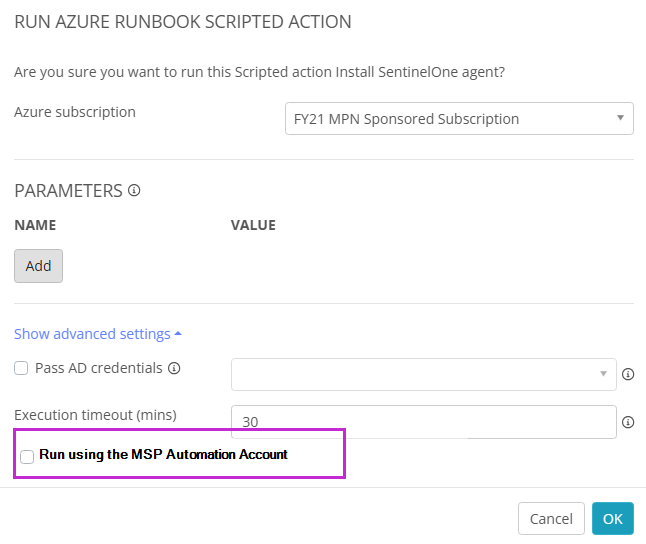
Maybe something like this where you would get the option to use an alternate automation account and then the customer specific vars would be passed through automatically?
Out of curiosity, do you have any other use-cases in-mind for how you'd want to utilize this feature? 


0
Avatar
Jakob Nøtseth
(Edited )

You are correct - I would be fairly quickly using this on very complex scripts :-D

This could be fetching data on customers for reporting issues, especially when Nerdio does not have enough of the fields we want to know and could use this to automate stuff while waiting for Nerdio new features. As an Autopilot provider, we need to have tenantId and GroupTags available before placing device-orders, but currently Nerdio does not provide this information and we could script against the tenant to fetch the required information as an export or log.

But changing any configuration toggle in any M365 product would also be possible. So many configurations we have are currently set as report-only where we have many customers wanting different choices - one being the Outlook External Warning - many customers wants us to have a flow rule adding this a as a div with text in the mail instead of using the built-in UI for Outlook Apps due to the poor UI in Outlook Apps.

I know I have some similarities in different forums here now, but the features would be able to fill out eachother, and some solutions would be more of a choice on the MSP on how you want/need to solve different issues.

As for how to handle this in Nerdio, since I personally have not been working with the AVD side of things, I would almost expect this to always run from the MSP automation account unless otherwise specified (i.e. “run locally” or something when required).

0
Avatar
Dave Stephenson

Thanks, Jakob.
Those are some awesome use-cases!

I also think you have a great idea for the logic on this.
If this is a ModernWork only customer, it can default to using the MSP's automation account, but if you add an Azure Subscription to the account in NMM, it will give you the option to “run locally”.
Otherwise, for AVD customers, it will default to using the customer's automation account.
Loving the simplicity! 😍

We'll have to see what our Product team can come up with on this feature.

0
Avatar
Jakob Nøtseth

Why do AVD customers need to default using a local azure autmation account? As far as I am concerned, you have a Nerdio application registration in the host tenant, this has a lot of permissions required for management, and you can refer to that identity in the customers enterprise application list. The identity is who you are and what you are entitled to. Apart from that I have just thought Nerdio is the automation engine, so why move the automation engine down to the customers subscription?

Even when looking at costs, I think running even a AVD disk size change command or whatever on AVD side of things, is so negligible it could easily justify the Nerdio engine just running it from host. But being able to select using “run locally” when a customer has added an Azure Subscription seems like a good option.

0
Avatar
Dave Stephenson

Great question, Jakob. 
They don't “need” it per-say, but many times, our partners will be co-managing the environment. In these scenarios, the in-house IT wants as much in-environment configurations as possible. 
Obviously, it would be most ideal to have everything belong to the MSP and have them take their “secret sauce” with them when they leave. 

From a cost allocation perspective, it's simpler to just assign all of Customer A's costs to Customer A, all of Customer C's costs to Customer C, etc.
When you try sprinkling costs across all of your customers, it can get a little muddier.
Although, if you're thinking of it as a “cost of doing business”, it's not a big deal.

It'll be interesting to see other partner's perspectives of how they want to handle this.
Per-Account Automation is how we have been doing it, but I can definitely see the use-case you're talking about where you already have the automation engine in-place. Why not just use the tool on a different vehicle? 🙂


0
Avatar
Ryan Clark

We are seeing more and more desire for this to fill gaps and use custom graph api calls. doing this PLUS adding a recurring schedule would be a great addition. For example, on a recurring basis set all user mailbox calendar permissions to the organization standard.

Please sign in to leave a comment.