ADSync during user creation

I've been working with our help desk on creating new users thru Nerdio. About 60% of our customers are hybrid and the AD functions work great. The only issue is syncing Entra Connect (AD Sync). I have to go to another server, run Start-ADSyncSyncCycle delta, then go back to Nerdio.

Since you're using the hybrid connection manager anyways, wouldn't it possible to setup the same kind of integration where we set the server name for Entra Sync and then issue that one command right from Nerdio?
 

4

Comments (2 comments)

2
Avatar
Dave Stephenson

This is a great idea, Mike, but I'm not sure if it's technically feasible to implement without a LOT of work.
Don't get me wrong, I'm not saying it's impossible, but likely pretty difficult for the reasons I'm going to talk through below.
I do have a potentially wild idea of how to handle this though that I'll cover as well just to see what you might think.

As far as I know, the Hybrid Connection Manager doesn't allow for additional commands to be sent to it/through it.
Because it's a Microsoft tool, Nerdio isn't able to make changed to the tool.

If we could send the command through there, there's no way for Nerdio Manager to know which server/computer has Entra Connect installed to be able to send the “Start-ADSyncSyncCycle” command.


You could get this to work today (outside of Nerdio) if you setup a scheduled task on your DC that looks for the user being created in the event log that triggers the PowerShell command to force a sync on your Entra Connect Server.
Example:

$action = New-ScheduledTaskAction -Execute 'Powershell.exe' -Argument '-File C:\Scripts\ForceEntraConnectSync.ps1'
$trigger = New-ScheduledTaskTrigger -OnEvent -Subscription '<QueryList><Query Id="0" Path="Security"><Select Path="Security">*[System[(EventID=4720)]]</Select></Query></QueryList>'
Register-ScheduledTask -Action $action -Trigger $trigger -TaskName "OnUserCreated" -Description "Runs when a new AD user is created" -User "SYSTEM"


Now comes my favorite part, the “Let's Frankenstein Something" that our Product team might be able to implement into the product! 

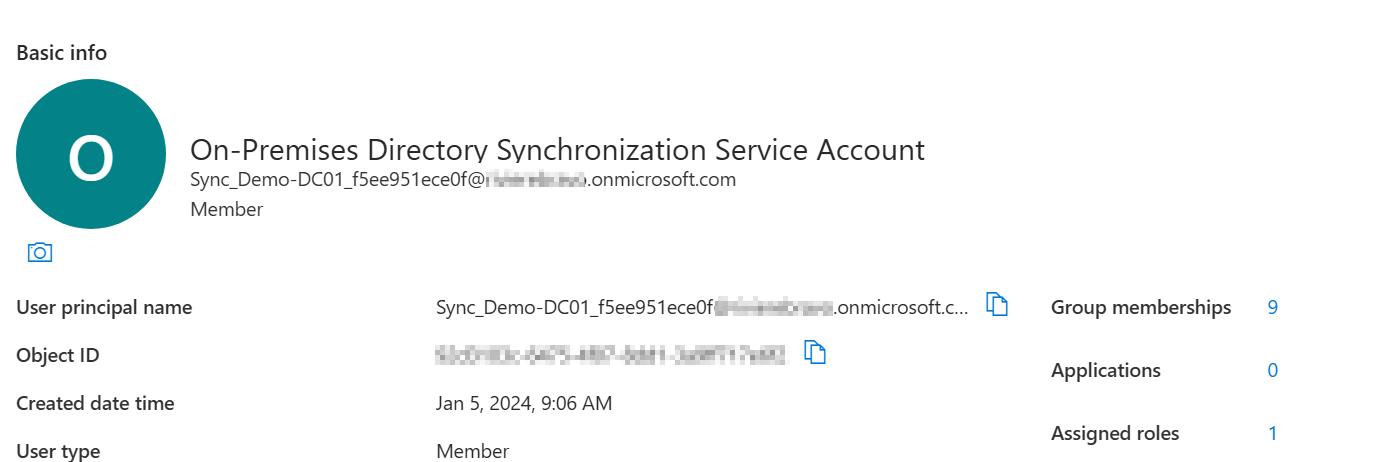
I was recently working with Microsoft on an Entra Connect issue and found out that there is a user that's created when you configure Entra Connect named “On-Premises Directory Synchronization Service Account” which has the Server where that's installed as part of the User Principal Name of the account.
i.e. Sync_Demo-DC01_<guid>@<tenant>.onmicrosoft.com
a.k.a.
Demo-DC01 for the server name.
 

With that information, and a little bit of PowerShell, we can extract the server name.

# Define cutoff time (last 24 hours)
$cutoff = (Get-Date).ToUniversalTime().AddHours(-24).ToString("o")  # ISO 8601 format
# Get all service accounts with the exact display name
$usersJson = az rest --method GET --url "https://graph.microsoft.com/v1.0/users?`$filter=displayName eq 'On-Premises Directory Synchronization Service Account'&`$select=id,userPrincipalName"
$users = $usersJson | ConvertFrom-Json
foreach ($user in $users.value) {
   # Get sign-ins for this user in the last 24 hours (top 10 to limit data)
   $signInsJson = az rest --method GET --url "https://graph.microsoft.com/v1.0/auditLogs/signIns?`$filter=userId eq '$($user.id)' and createdDateTime ge $cutoff&`$top=10"
   $signIns = $signInsJson | ConvertFrom-Json
   if ($signIns.value.Count -gt 0) {
       # Extract server name from UPN, format: Sync_<ServerName>_<random>@domain
       if ($user.userPrincipalName -match "Sync_([^_]+)_[^@]+@") {
           $serverName = $matches[1]
           Write-Output "The Entra Connect Server is:" $serverName
       }
       else {
           Write-Output "Could not parse server name from UPN: $($user.userPrincipalName)"
       }
       break  # Stop after finding the first recent login
   }
}

Once we know that, we can use that information to run a scripted action against a domain-joined machine.

# Convert plain text password to secure string and create credential object
$securePassword = ConvertTo-SecureString $ADPassword -AsPlainText -Force
$credential = New-Object System.Management.Automation.PSCredential ($ADUsername, $securePassword)
# Trigger Azure AD Connect sync remotely on the target server
Invoke-Command -ComputerName $serverName -Credential $credential -ScriptBlock {
   Import-Module ADSync -ErrorAction Stop
   Start-ADSyncSyncCycle -PolicyType Delta
   Write-Output "Azure AD Connect sync triggered successfully on $env:COMPUTERNAME"
} -ErrorAction Stop

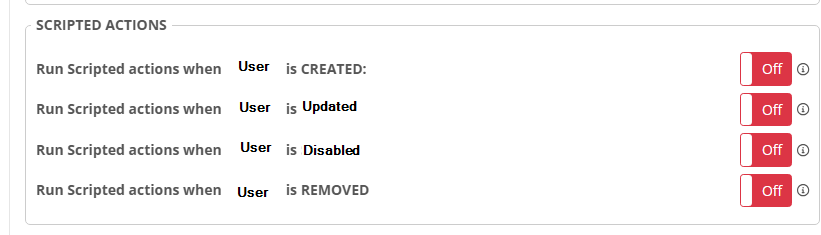
Assuming all of those stars align, Nerdio Manager could then trigger it (or any other scripted action) as part of an Add/Remove/Update User task.
There is an “User management (day 2 operations)” entry on the NMM Roadmap that this kind of thing could fit perfectly into.
To me, adding actions (similar to how we're doing the VM Creation tasks), would be a great way to handle this, and other similar requests where we need actions to happen when we add/change/remove a user.

Do you think something like this might work for you in the future?
Or, am I not considering something?

0
Avatar
Carl Long
We appreciate your feature request—community input is essential to our ongoing development.

Next steps:
     • We will review your suggestion and update its status during the evaluation process.
     • If further clarification is needed, we'll contact you via comments.

We also encourage others to contribute through feedback and voting.

Please sign in to leave a comment.