Feature Request - Scale-in for Desktop Images

We have a number of desktop images that are regularly powered on for maintenance by an app support team and they usually forget to power them off when they're finished.

If we could have a Nerdio native way to scale in a desktop image if there are no active RDP sessions that would be great.

We could use Azure native automation to do this, but then we wouldn't be able to use Nerdio OS Disk optimization.

4

Comments (5 comments)

0
Avatar
Daniel Lundqvist

Or if you at least can get a notification when a Desktop Image has been running for a specific time (ie 24 hours +), or create scheduled report that shows all Desktop Images that has been running for a specific time (ie 24 hours +).

0
Avatar
Carl Long
Thank you for submitting your feature request—we truly value input from our community.

Next steps:
     • We will review your request and update its status as it progresses through our evaluation process.
     • If any clarification is needed, we'll follow up with you directly in the comments.

We also encourage the community to influence our decision through comments, votes, and feedback.
0
Avatar
Chuck Mikuzis

Good Afternoon,

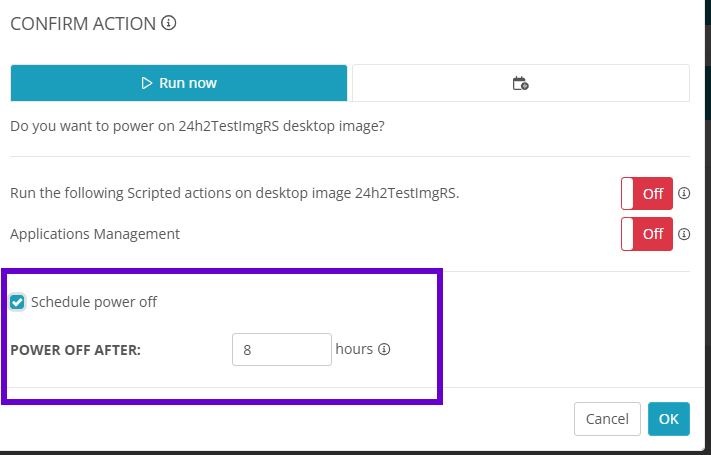
   The desktop image “Power on” function does include an option to schedule a power off.  If this was defaulted to being enabled, would this help resolve this?


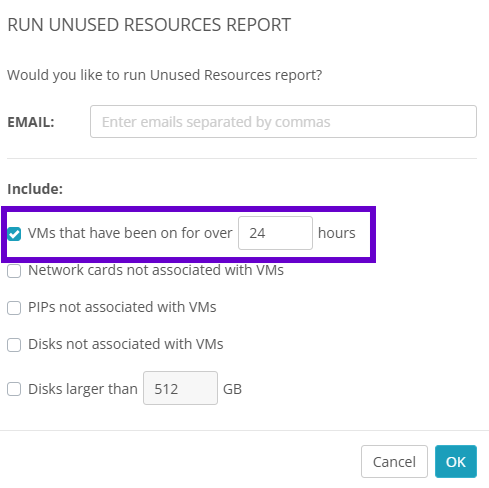
Nerdio Manager for MSP also includes reporting available at the account level Reports>Report Summary for an “Unused Resource Report”.  This report can be run ad-hoc or scheduled to include VMs that have been running for over a set period of time, including those desktop image VMs:


Please let me know if this helps with these concerns.  Thank you!
Chuck M.

0
Avatar
Rob Kayll

Hi Chuck,

We don't have those options when powering on a desktop image, though if we were to set a default there it might power off a desktop image that is actively being worked on when the timer runs out.
 

We're not running the MSP edition of Nerdio so I don't think we have access to that report. Is that something that can be added to the business edition?

A Nerdio native way to power off desktop images without any active session would be preferred so we can use disk swapping and won't interrupt anyone actively working on the image.

0
Avatar
Daniel Lundqvist

Hi Chuck! Don't think setting the “Schedule power off” options as default will solve this problem, because sometimes a Desktop Image is running for a day, two or three days. It depends on what the technician is doing on the Desktop Image.

A report is good, but I would say it is prefered to run this on the MSP level. So that you would get a summary-report of all Desktop Images on all accounts that has been running longer than x hours. And only for Desktop Images. If it would only be possible to run this on the Account level, thats better than nothing. As long as you can schedule this report to run on a specific intervall (ie daily, 48 hours, weekly etc).

Please sign in to leave a comment.