FSLogix Container Size Report

First - Thank you for this report, this is a big win for my support engineers in helping find those handful of users misbehaving.

However, I was somewhat dismayed to realize it is captured from FSLogix event logs, not actually scanning the Azure Files Share.  I'm curious if there is a technical challenge to doing it that way?   My use case is a customer who is insistent that his users be allowed to ‘stay’ logged in and not be forced out daily.   While we discourage the behavior of course, in this particular case we negotiated a weekly logout (by way of reimaging) - and things are happy.   However, because the users don't logout frequently, the report doesn't tell us what has really changed until they logout/login over the weekend or start of the next week.   

So my suggestion is to keep the report as is (unless it is an easy change to have the report collection task actually iterate through the azure files storage) - but add a new feature.   Maybe part of the user properties page, or something to add to action sessions as a tooltip or popout.   This could be something that queries the profile size right then and there (I'm assuming that query, scoped to one particular user would be quick).  Icing on the cake - whatever display shows the current size limit of the applicable FSLogix profile. 

Ultimately, the report as is holds great account level value.   I'm interested in expanding that for support/escalation engineers to get right to the cause of the typical max size limitation behavior of FSLogix profiles, quickly.   Either they find that the user is hitting the limit, or they are not (And have to look for a different cause)

3

Comments (10 comments)

1
Avatar
Travis Lamming

To add to this, I'd like for it to show old profiles that are no longer linked to active users. It would be nice to have a report so that we could see orphaned profiles to clean up space in the azure files store.

1
Avatar
John Tokash

Very good point  - including the last modified date at a minimum would help highlight whether it is in use or not.   Icing on the cake (bonus points), to tie it to a user and highlight if the user is no longer assigned, or is disabled.

1
Avatar
John Tokash

Good use case example - this customer who stays logged in for up to a week at a time.

Existing report shows a profile at ~50gb

Actual profile size on disk (checked in the share) - ~57gb

After this weekends forced logout where fslogix has a chance to do some shrinking - ~45gb

So I think this helps build the case that while this is a good thing, the report availability, some improvement would be appreciated.

1
Avatar
Dave Stephenson
(Edited )

Loving this discussion, John and Travis!

The FSLogix Profile Container Size Report, strikes a good balance of functionality/information for a starting point. (definitely room for improvement).
Just as a design note, the existing report is great because it doesn't care if the Profile is on Azure Files, NetApp, or a File Server. It's able to report on all of them because we're doing it through the logs.


I've been thinking about pulling directly from the file share as well.
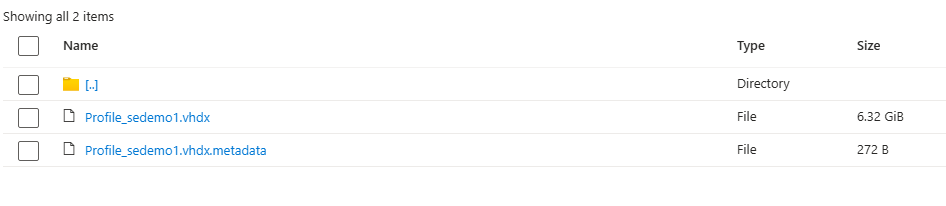
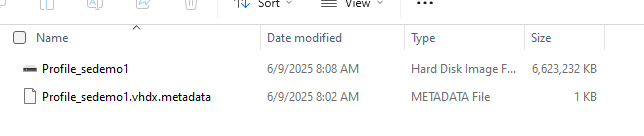
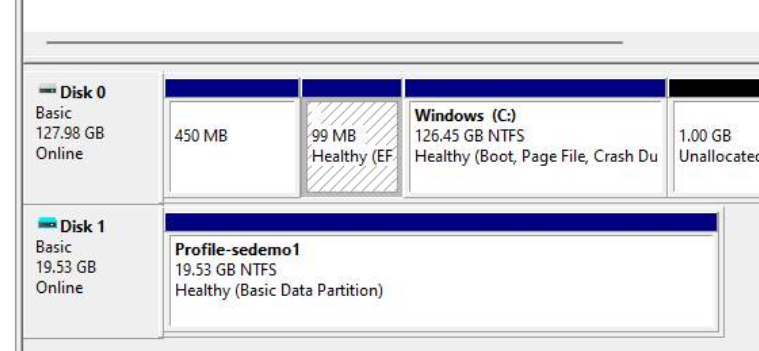
The biggest issues I can see, just off-hand, is the discrepancy between the virtual disk in Windows and the disk in the file share. (See screenshots below)

It would be considerably easier to pull the attached disk info with PowerShell, but the users have to be actively logged-in to do it.

Do you think if we pulled the active disk size, the last modified date/time, the FSLogix log size, and displayed it on a single report, that would do what you're needing/wanting?


Sorry for thinking “out loud” like this.
I know I've had the same problem/question since I started working with profile disks so it'll be great to find a way to report on this consistently and take action on it.

PowerShell to pull disk info
 Get-Volume | Where-Object { $_.FileSystemLabel -like "Profile-*" } |
>> Select-Object DriveLetter, FileSystemLabel,
>>     @{Name="Size(GB)";Expression={[math]::Round($_.Size/1GB,2)}},
>>     @{Name="FreeSpace(GB)";Expression={[math]::Round($_.SizeRemaining/1GB,2)}}
 

Azure Files/File Explorer
 

Disk Management


1
Avatar
John Tokash

Oooh - now things get more interesting.   I'm looking at it from a lens of an old motto a mentor of mine shared with respect to Monitoring - “Monitoring is the art of looking for something you didn't know you needed to look for” :-) 

So in my use case, the report (a scheduled collection of data that can be sent somewhere for review) - serves to bring attention to a condition.  In my use case example, making appropriate contacts aware that a user is approaching a limit and in order to avoid an issue, action might need to be taken (whatever that might be). 

The discrepancy between storage account view and OS view - that is just extra icing on the challenge :-)

Given how different the varying data can be, I think it makes sense to break it apart a bit maybe?    Approach it from two angles…

1- How to get the report to be the most valuable.

2- How to get relevant/pertinent/latest data in the hands of a responding engineer.  Ideally, alerting before the user is impacted but in this particular example I provided, lets assume it has already impacted the user, hence the “responding engineer”.


For item 1 - I think your suggestion is excellent, include active disk size, the last modified date/time, the FSLogix log size, and displayed it on a single report

For item 2 - odds are significantly high that the user is indeed logged in - if an engineer is responding to a reported issue.   We try to train users to logout/login as a first response to any unexpected behavior (likely a different session host, user processes are all started fresh, and it gives fslogix an opportunity to work its magic or report an issue in logs).    So if we -can- safely assume the user is logged in, getting these metrics could be a task in the dropdown for each individual user in the user sessions view in NMM right?   Alongside console connect, shadow and logoff - we have an option to ‘grab’ profile usage stats from all relevant places.


And I do apologize for neglecting the fact that not everyone is using Azure Files.   You are bringing up an excellent big picture point Dave - that the storage solution itself plays a part here.

1
Avatar
Travis Lamming

Great discussion. I think data based on logged in users is fine,  you could grab the data as soon as the system realizes they have logged in, you could even make it part of the log out/log in process I suppose, instead of at a certain time of day, since users all have different schedules sometimes.

I agree, the biggest thing is to generate data that is worthwhile knowing, “hey, this fslogix profile is set for 50 gig limits and they are at 45 gig now, better warn the user” and "hey, this profile has not logged in for 90 days, care to delete it? (we wont really care of the size). That way, the login time you are using sets both the time to take a reading on the profile space, and also if it never logs in, sets the time for unused profiles.

hope this makes sense.

1
Avatar
Dave Stephenson

Haha. 

The discrepancy between storage account view and OS view - that is just extra icing on the challenge

Classic! 😂

In all seriousness, a two-step approach might be the way to go with this. 
We'll just need to figure out the “source of truth”.

The benefit to getting it from the logs is that when the user logs-out, their profile disk will be compacted automatically (by default) so the disk size that's being reported is the final post-compaction size.
However, that method still leaves the window open for support tickets/real-time space issues where they fill-up their disk and can't figure out why they can't receive emails or download anything.

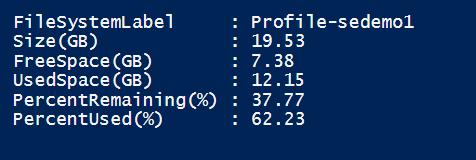
In doing some more testing, it looks like we can get the profile disk size from the OS (within ~ 0.5 GB of what the storage location shows (i.e. OS = 2.17 GB AzureFiles = 2.53 GB (which could be considered a reasonable margin of error . . . )
The great thing about this is we don't even need to worry about “What size is the profile set to in FSLogix?” because the disk will show the max size of the profile disk (as configured by FSLoigx) as part of the PowerShell query.
 

Get-Volume | Where-Object { $_.FileSystemLabel -like "Profile-*" } |
Select-Object FileSystemLabel,
   @{Name="Size(GB)"; Expression = {[math]::Round($_.Size / 1GB, 2)}},
   @{Name="FreeSpace(GB)"; Expression = {[math]::Round($_.SizeRemaining / 1GB, 2)}},
   @{Name="UsedSpace(GB)"; Expression = {[math]::Round(($_.Size - $_.SizeRemaining) / 1GB, 2)}},
   @{Name="PercentRemaining(%)"; Expression = {[math]::Round(($_.SizeRemaining / $_.Size) * 100, 2)}},
   @{Name="PercentUsed(%)"; Expression = {[math]::Round((($_.Size - $_.SizeRemaining) / $_.Size) * 100, 2)}}


In theory, if we can run a recurring task in NMM (every 5 minutes like we do for the Autoscale checks?)  to run a PowerShell script against a host to get the real-time size of the profile disk and notify the MSP at one threshold and (optionally) the end-user (by a notification similar to how we can send a message about a maintenance task) at a different threshold.

That way, with the two-step, we're getting post-compaction notification and real-time notification as well.
At that point, the only other piece we would need would be a clean-up task like Travis mentioned, but we may be able to tie-into some kind of approval workflow to accomplish that.

Hmmm . . . 

We'll have to see what our product team can come-up with.
It's quite possible there's a more elegante way to handle it.


2
Avatar
Travis Lamming

Dave’s cooking! How you describe it sounds awesome, I can’t think of anything to add, other than maybe a global view with all of these reports aggregated so we don’t have to check each tenant report or something. 

Awesome 

0
Avatar
Dave Stephenson

Thanks, Travis!

A Global View sounds like a great solution, just to have visibility (i.e. all profiles with <10% free space) and then tie that into a notification that automatically opens a ticket in your PSA and automatically closes the ticket if the space resolves after a log-out/compaction . . .
Man! I'm getting excited about the possibilities of this. 🤓

Keep the ideas coming, guys!


1
Avatar
kurt melo
(Edited )

This is absolutely needed. I came looking for this discussion and see Dave already has some ideas. Global View would be great as well. 


Please sign in to leave a comment.