Add the ability to install Console Connect while powering on an Image (Planned)

Hi,

I recently had to perform some manual steps and troubleshooting on a Desktop Image for one of our customers.

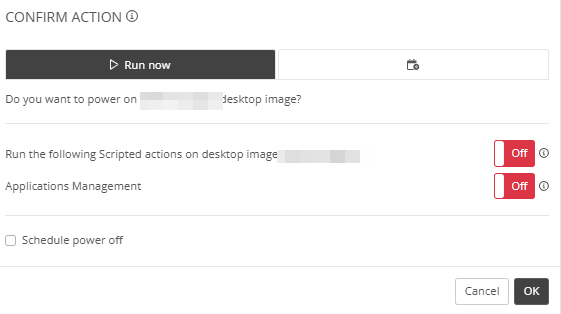
It would be handy to have an extra option to install Console Connect during Power On.

Currently, I have to turn on the VM, wait a few minutes, then manually install Console Connect, and wait another few minutes before I can access the VM.

So probably not a huge feature, but still a nice way to save some time :)


1

Comments (5 comments)

0
Avatar
Dave Stephenson

I like this idea, Philipp!

It's nice that we can connect to the Desktop Image with Console Connect, but it is uninstalled (automatically) each time we run a “Set as Image” task because of the SysPrep process.

I wonder if we attack this from multiple sides if it would be possible to do what you're wanting?
(worse case, we have a lot of options for our product team to look into😇)

  • Add an option to the Power On wizard to “Install Console Connect” (like you mentioned)
  • Have an Account-Level setting to automatically install Console Connect on any Desktop Image VM when it powered-on by a user (not by automation)
  • If the CC Agent is installed, uninstall it with a local PowerShell script from the cloned VM instead of uninstalling the agent from NMM (which removes the agent all together) so the Desktop Image VM still has Console Connect
  • If the CC Agent is installed, automatically add a task to reinstall the CC Agent after the Set as Image is complete
  • Add an option to the “Set as Image” wizard to reinstall the Console Connect agent on the Source VM after the Set as Image task is complete

Or, am I completely off-track and suffering from the ramblings of a mad-man on the way to the weekend? 😂

1
Avatar
Philipp Mair

Hi Dave, just got back from vacation!

Cool, you found quite a few ways to achieve what I want! 😊

I think the easiest would be to just have the option at the Power On wizard to “install console connect”. But the other options would work as well.

So I guess it depends on the product team and which option they can implement 😊


0
Avatar
Dave Stephenson

Thanks, Philipp!

I'm all for “easiest”, but let's see what magic our Product Team can produce. 🪄

1
Avatar
Philipp Mair

Great. Let's see what the Product Team says :)

1
Avatar
Gido Veekens

Hi Philipp Mair I agree that this would remove the repetitive steps to deploy the agent each time you're managing an image. Your suggested solution makes sense and is relatively easy to implement, so please expect this in an upcoming release. Thanks for bringing this to our attention!

Please sign in to leave a comment.