
In Intune when assigning an app to a group, there's the option to set the app availability so it deploys at a specific time. It would be great if the assignments section in Nerdio also allowed this.
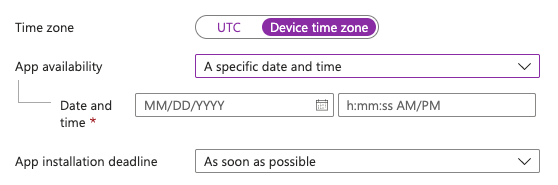
In Intune when assigning an app to a group, there's the option to set the app availability so it deploys at a specific time. It would be great if the assignments section in Nerdio also allowed this.
Great idea and welcome to the community, Brice LaBelle 🙂!
Being able to specify the App Deployment Settings would be a great feature.
As far as I know, app deployments to “As soon as possible” by default.
Do you have a use-case where you need to have apps deploy at a certain time or maintenance window?
Or, do you potentially see this (app availability) being a variable (like an inherited variable) that can be changed per account so you don't need to maintain multiple apps/policies? 🤔
Hi Dave,
We schedule app update deployments for things such as Autodesk Desktop connector, Revit, and AutoCad to our clients once or twice every week. We schedule them to go out over night because the apps have to be closed for the updates to install and we don't want to interfere with productivity during the day. The deployment schedules across our clients rarely align.
What I would love to see is on the app assignments page at the MSP level, instead of just choosing the accounts to assign the app to, that we could also choose which user/device group(s) the app is assigned to in each account as well as the schedule. That way we can upload, assign, and schedule an app deployment across multiple clients from the same MSP page and not have to navigate to each account page or each Intune tenant separately!
If I could wave a magic wand, I would also include a checkbox on the assignments page that would reboot the devices at the time of deployment (not after). Most MDMs include an option to reboot after a deployment, but I've found that 99% of the time the deployment is more effective if I reboot computers just beforehand to clear out things like pending reboots/windows updates, and make sure the apps and services that are being updated are not running.
Thanks for the follow-up, Brice!
Now that you mention your use-case, I'm having a “duh” moment. What you're describing sounds like a common scenario.
The global schedule/assignment might be a bit difficult to pull-off because it will involve a redesign, but maybe if we tie Group Templates and Global Schedules, we could do it without too much effort . . . 🤔
We'll have to think on that.
I'm really loving your idea around “reboot prior to install”. It's one of those “Now why didn't I think of that?" ideas. 😍
We have the “Restart VM(s) after script execution” checkbox for scripts but adding a “Reboot device prior to task execution” option to all of our scheduled items could be a great addition and help prevent a lot of those problems (i.e. pending reboot/updates) that you mentioned. We'll probably want to put a time window for the pre-reboot (i.e. 5,10,15,30 minutes prior to task execution), but that should be fairly easy to do in comparison.
Yes the way we currently manage the time window is by scheduling the reboot 10 minutes before the deployment becomes available so it doesn't start to install and then get forced to reboot.
Another thing we do with the reboots is use a custom script which presents a dialog box to the user warning them that the computer will reboot in 30 minutes (so we schedule the reboot 30 minutes prior to when we actually want the devices to reboot) and they can choose to cancel it if they are still working on something late that night. It works by creating a one-time scheduled task that gets deleted if the user clicks cancel. I'm happy to share the script if that's helpful.
I was thinking about how Global Schedules might be used. It would be useful to have a scheduling option for “this Tuesday” or something like that. Many of our pilot deployments for example go out each Tuesday night but we don't need it to run that same deployment again every week, so the “weekly” option doesn't quite work - and having to create a new schedule every week for the exact date isn't convenient either. So having a dynamic Global scheduling option that would do a one-time deployment on “this Tuesday” or “next Wednesday” that we could re-use would be very helpful.
Thanks, Brice!
If you want to add scripts, we have a spot on our forums for Scripted Actions on our forums (Scripted Actions and Azure Runbooks – Nerdio Help Center), but no pressure if it's something proprietary I'm sure other partners could figure something out for it.
That's an interesting insight on the “this coming day of the week” schedule.
I wonder if we can specify a Maintenace window for a customer account and that will do what you're wanting or if the “day of the week” would be an easier solution . . .
We'll have to see what our product team can create.
Please sign in to leave a comment.

Comments (5 comments)