
I've had a number of partners reach out recently regarding using Azure Files shares as a mapped drive on local workstations. This is certainly an option but only in specific scenarios, and there are limitations to using Azure Files in this manner. I'll be going through some use-cases and limitations below that I hope will be helpful to our partners.
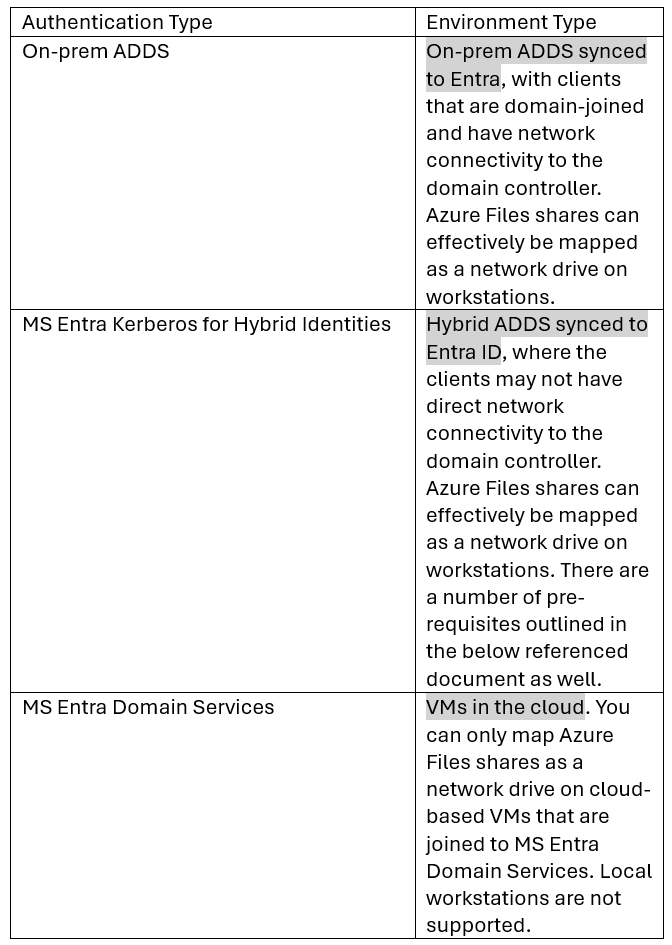
Here is a quick chart showing what authentication methods are supported and their use cases:
The first two options would allow you to map a network drive to a local workstation as long as the workstation is ADDS joined. The third authentication option only applies to VMs in the cloud.
For more detailed information on the supported authentication methods for Azure Files shares, see this Microsoft guide:
https://learn.microsoft.com/en-us/azure/storage/files/storage-files-active-directory-overview
Comments (0 comments)