Trusted Launch Help

I have a ticket open with NMM support too and will update this if needed.

I'm trying to use Trusted Launch for the first time.  I created a desktop image using the Azure gallery image Windows 11 24H2 multi-session + M365 apps Gen 2.  Once I selected that image, Trusted Launch was automatically selected.  D2s_v3, was the defaulted VM size, but I changed it to the same one, but v6.  

I made some updates and tried to save as image.  I got the error below:


Next I tried to resize the VM using the same size, but going from v6 to v5 and got the below error:
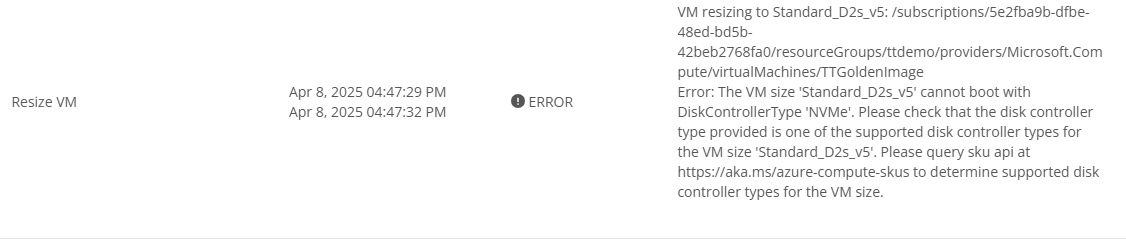
I can't find any information on this DiskControllerType that I understand.  I also researched and found that the D2s is maybe not compatible with Trusted Launch.  A Microsoft article I found said that d2as was.  I tried to resize again, but received the same error.

Again, this the first time I am trying to use Trusted Launch.  What am I missing?  I haven't tried yet, but can I create a Windows 11 VM without Trusted Launch?


Thanks,
Steve


0

Comments (7 comments)

0
Avatar
Steve Hopler

Just an update.  I found that D2s_v6 requires a NVMe disk, so that was the issue.  I was unable to find out if there is a way to change the DiskControllerType back to SCSI.  I ended up deleting the desktop image and creating another using the default D2s_v3 VM size, which has a default DiskControllerType of SCSI.  I have since been able to save as image without error.  

I'll likely have some more Trusted Launch related questions soon. 

0
Avatar
Dave Stephenson

We've seen that a few times where if you have a v6 image for your Desktop Image VM, it will fail on the “Set as Image” or “Clone" task because of the disk controller. I know our product team is working on a solution for that, but in the meantime, a lot of partners change their desktop image VM to a v5 SKU and then do the “Set as Image”/"Clone".

Once they have the image, they're able to deploy the image to a v6 SKU host pool without any issue.

Do you know if that works for you?

1
Avatar
Steve Hopler

I'm good now.  I went back to a v3 desktop image and was able to create the image without issue.

0
Avatar
John Tokash

I suspect I am encountering a very similar issue, but I'm not clear on the mitigation here.

My defacto image is using a b4ms, and we deploy to d4adsv5 with no trouble (both scsi).   When attempting to deploy that image to a d4adsv6, i get the disk controller error.  

I created a new image on a d2adsv6 for testing, and tried to deploy to a session host running a d2adsv6, and still get the controller error.   This seems like it should have worked without issue. 

What am I missing here?   

0
Avatar
Dave Stephenson

Great question, John.

I'm guessing you have Trusted Launch configured on your desktop image?
If that's the case, you could be facing a limitation of NVMe disks in Azure.


That being said, we're working on additional v6 SKU support in our v6.1 release of NMM so the issue you're facing could be resolved with that release.


0
Avatar
John Tokash

Dave,    Thank you for the response.   I see the challenge with using existing images where Trusted Launch is in place.   I'm not sure how the Product team would work around it, but I'd be thrilled to see it!

That said, in my second test though, I created a brand new image (Windows 11 24h2) with trusted launch enabled I believe, but on a v6 VM of the same family right from the start, and encountered the same error.  My thinking was there was an issue with conversion, but starting fresh should be good.    Maybe I need to revisit and verify my steps to make sure I did what I thought I did.    Would you have expected that to be ok then?

0
Avatar
Dave Stephenson

You're very welcome, John.

I'm not sure on that. I've personally done pretty minimal testing on the v6 SKUs.
What I have seen is there's something with the way we're doing the temp VM that's not allowing it to be captured correctly. (Although, I may be misremembering)

However, typically, if you have a desktop image that has the NVMe disc controller, it will be able to be deployed to a v6 SKU host pool without any issues. Let me see if I can do some more testing on my-end to get a better answer.

Or, if anyone else from the community has insights to share, I definitely welcome them. 🙂

Please sign in to leave a comment.