Custom role to delegate account creation

Hi,

we would like to give some users limited rights in Nerdio at the MSP level. They should be able to add new customer accounts, but they are not allowed to change anything else at the MSP level. Especially on the role assignments page as they could potentially make themselves Super Admin.

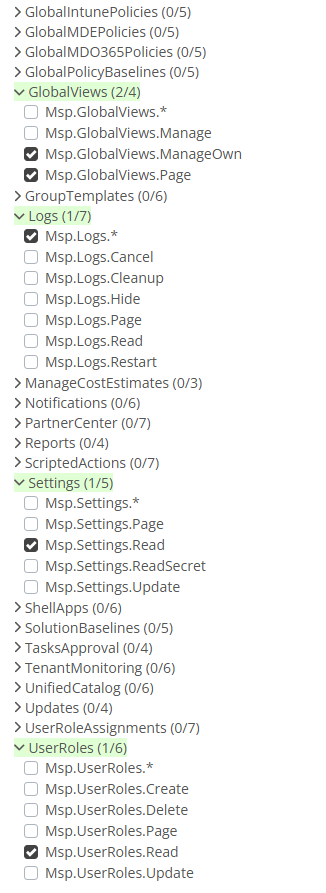
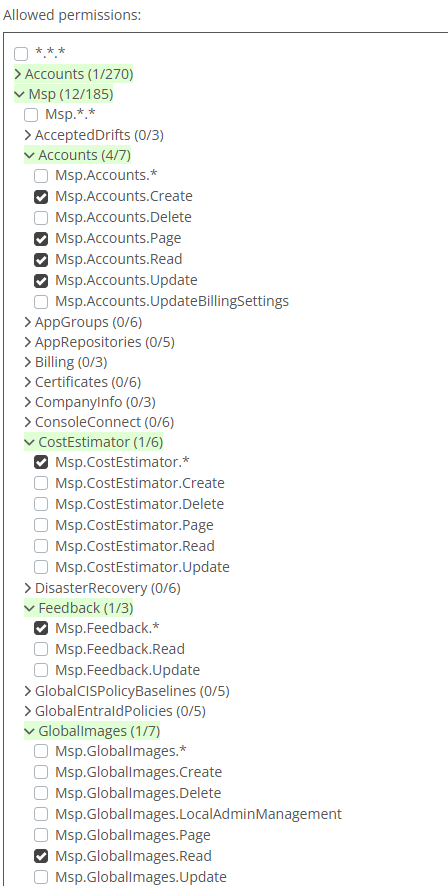
We configured the following role:
The user is able to run Step 1 in the account creation wizard but then immediately gets an error, that the account is not found:
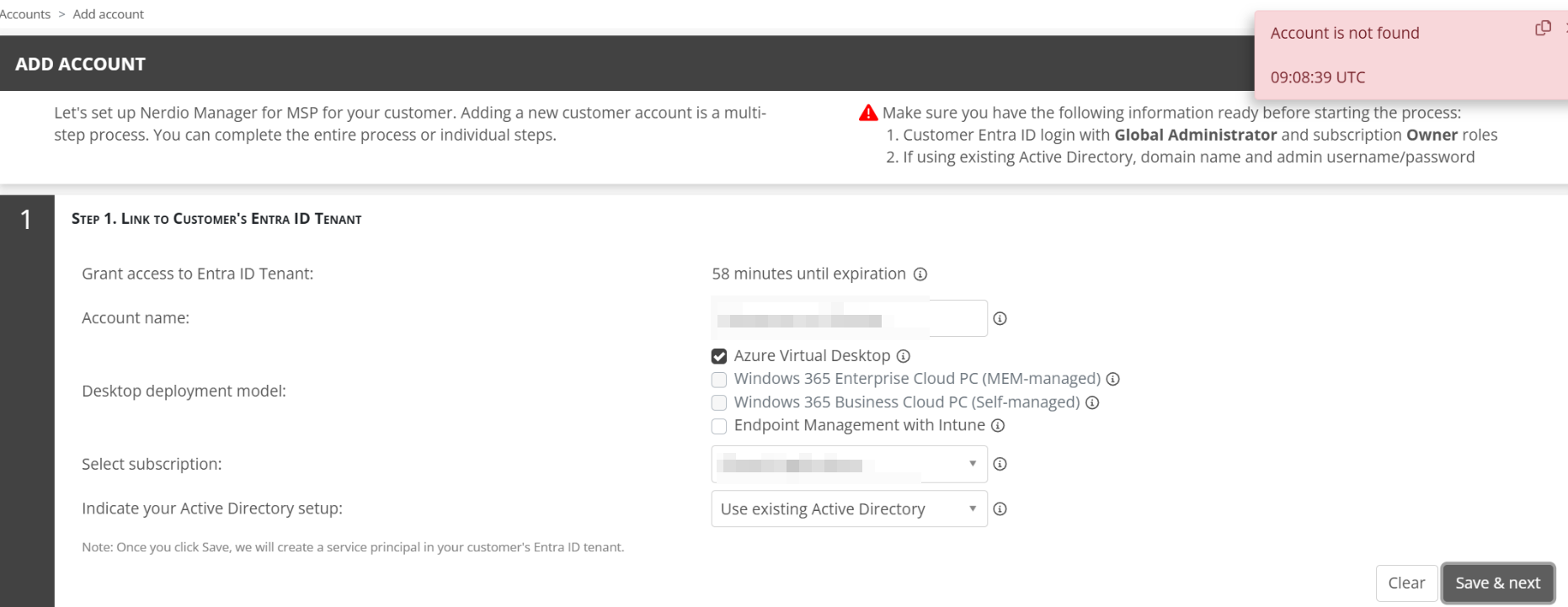
 

After that, a Super Admin has to assign the account to the user's group and the setup process can be continued. The rest works just fine.

I was expecting, that at some point the Super Admin has to intervene and modify the role assignments but I was hoping that this would be after the final step 4.


Is there maybe a more elegant way to achieve this? Would assigning the right "Msp.UserRoles.Update" be enough?


Regards

Philipp


0

Comments (4 comments)

0
Avatar
Dave Stephenson

Hmm. That's a tough one, Phillip.
I'm guessing they're getting the error that because their role isn't assigned to All accounts and once the initial account is created, they're not able to do the rest of the steps.

We might be able to add more granular permissions to allow the user to complete the account creation wizard or add an option to manage all accounts except the MSP/IUL account (that's a pretty common ask).
Another thing we could do, but would likely take quite a few development hours to create, would be to create a "Permissions Recorder" that would track/record the permissions that are needed to complete a task and make a new User Role from that recording.

As far as a more "elegant" solution, you could utilize our API (see Nerdio Manager Partner API - Getting Started – Nerdio Help Center) or our new Partner Center integration (see Link a Partner Center account – Nerdio Help Center) to handle the account creation.
The one draw-back to the PartnerCenter method is it creates the account(s) as non-AVD accounts, but enabling AVD isn't too difficult to do (see Enable Azure Virtual Desktop for a Modern Work account – Nerdio Help Center).

Of those options, do you think one of them would do what you're wanting or did you have something else in mind?

1
Avatar
Philipp Mair

Ok I just modified our custom role and added the three permissions Msp.UserRoleAssignments.Read, Msp.UserRoleAssignments.ReadGuests and Msp.UserRoleAssignments.Update

With those permissions I was able to finish the account creation wizard without any error. And since I'm not showing the role assignments page, the user is also not able to modify any existing permissions. I need to check with our team, if this is enough but it looks promising!

Thanks for pointing out the option with the Partner Center. I'll take a look at it!

0
Avatar
Dave Stephenson

Thanks for letting the community know you found a solution!

Hopefully it works for your team or the Partner Center thing as an alternative. 🙂

0
Avatar
Philipp Mair

Hi again,

I just did another test. During my first test, the user object was directly assigned to Nerdio under "Role assignments." In this scenario, Nerdio can assign the new account directly to the user, and everything works fine.

However, in my second test, I added the user to an Entra ID group that was assigned to the custom role in Nerdio. Here, I encountered the same issue again: the user cannot continue the account setup without intervention from our Super Admins.

I guess we'll need to have a look at the Partner Central method...

Please sign in to leave a comment.