Solution Baseline Reporting

My colleague and I have been slowly configuring our solution baselines for the different products within Nerdio. What we've found difficult so far is gathering information on accepted drift as it pertains to the baselines. It would be nice to have a column within the "View details" link on a solution baseline status page which shows that drift has already been accepted for a setting. Equally useful would be for the information in the column to somehow display who accepted the drift, when, and for what reason. Maybe this could be achieved with additional columns, mouse over text, or a link to another page? An export function on the View details pane would also be great.

Also, we submitted a ticket inquiring as to how one might view the reason provided when drift is accepted, but the rep who worked with us stated that they didn't think this was viewable anywhere within the UI. If the above can't be done, it'd still be helpful to allow for the viewing of this information given how many people and clients we have in our instance. 

1

Comments (5 comments)

0
Avatar
Dave Stephenson

Welcome to the community, Dawson Christianson 🙂!

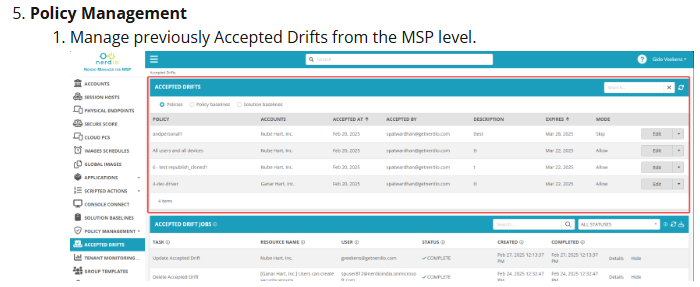
In our v5.8.0 release, we added an Accepted Drifts module to the MSP level of NMM (see screenshot below).
It doesn't have the export functionality like you're requesting, but it's possible that we could add that.
Out of curiosity, can you explain your use-case for the reporting/export for the drift?
Is it something your team uses when doing reviews (i.e. Technology Business Review (TBR), Quarterly Business Review (QBR), etc.) or is it for internal tracking?

0
Avatar
Dawson Christianson

To elaborate on what we're suggesting, we'd like to be able to see on the following window that drift has been accepted so that we're not having to go between windows and do different searches to see whether or not drift has previously been accepted or if the drift we're seeing is something new. Being able to export this page would really just be a nice to have for sharing what we see here with both our management as well as our customers. We're being asked to provide a way to generate reports on the information below and an export button would just make that easier. 

Not being able to determine new vs already accepted drift on this window seems like a miss though. This was taken from a test policy, and we actaully accepted the drift on the last setting as a test, but nowhere in this view does it let us know that. We would have to go to a separate blade entirely or do a search on the tasks within the baseline status and compare what we find there to what is shown here. 

Hopefully this helps clear up any confusion.

0
Avatar
Dave Stephenson

Ahh. Thanks for clarifying.
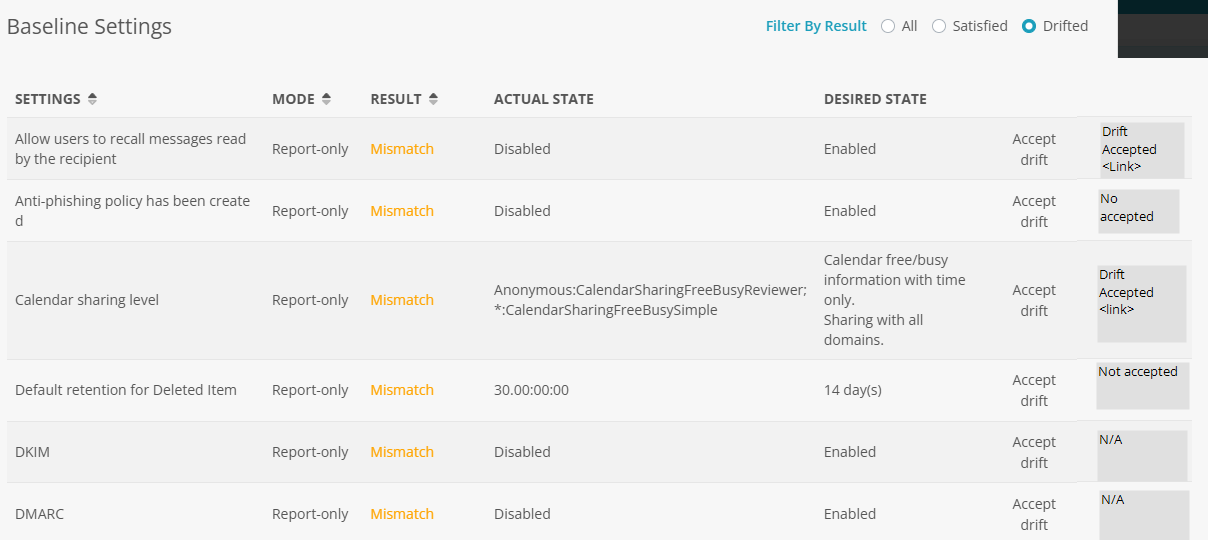
It sounds like you're wanting to be able to see the accepted drift as part of the Baseline Settings Details screen so it streamlines the baseline review process.

Here is a rough mock-up I put together (I'm a visual person so it's easier for me to see something).
Please let me know if I'm understanding correctly or if you had something different in-mind.

Basically, if the drift was previously accepted, it will have a link/button that you can click on the see the details from the drift.

0
Avatar
Dawson Christianson

Exactly, something like that with details about the accepted drift if possible. 

0
Avatar
Dave Stephenson

Thanks for confirming, Dawson.

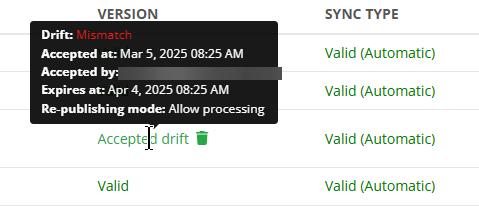
I know we already show some information when you hover over the drift acceptance.
Maybe we can add the notes/reason for the drift on hover.
We'll have to see what our product team can come up with. 


Please sign in to leave a comment.