
This is kind of a best practices question: If Install Applications is enabled at VM Deployment in host pool properties, is there a reason to update those apps on the image? You could schedule the Scripted Actions to update Windows and 365 apps to run monthly, and set as image, and leave it at that. Or you could use an Azure Marketplace image, if you don't need anything that is not in UAM.
Any reason to update UAM apps on an image if UAM runs at VM deployment? (Answered)
0

Hmm. Great question.
Here is my take on it, but please don't take this as "Gospel" or anything 🤣.
(I'm sure others will have differing options)
If you're deploying on Host creation, there "technically" isn't a reason to deploy it on your image too.
You can do both (just for that "belt and suspenders" peace of mind), but at the end of the day, it's just longer that your desktop image VM is running so potentially increasing your costs.
That being said though, if you have the apps installed on your image, and there are no updates, using Install Applications won't add too much additional time to the host deployment. It's just when it needs to install/update the app where it will delay your VMs being available.
However, like you said, where Install Applications would be really useful is if you do not use a custom image and are just using the Azure Marketplace images.
It could save you some money on maintaining images, if the use-case is right.
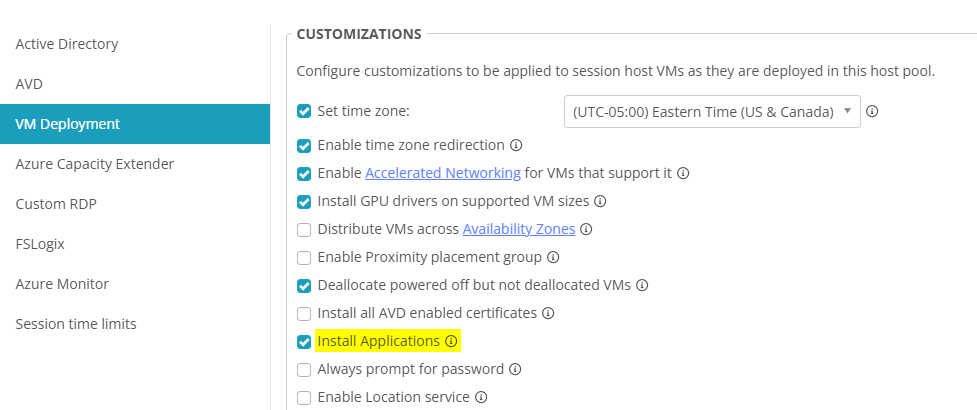
For this host pool, we're not too sensitive to host provisioning time, because I over-provisioned it. We have 1 - 2 hosts that are not running (start on connect) so we're only paying for their P10 disks. I think that's a better way to address delays deploying new hosts, because even if you update apps on your image VM weekly, you also have to update the image. That's probably still less cost than a P10 disk, but no one's going to want to wait for a new host to be deployed before they can work.
These are the trade offs that keep things interesting.
Very good points, Peter.
You've got to balance the user's tolerance for waiting vs the desire to save costs.
I don't think there is one right answer. It just depends on your company, your customer, and the Venn diagram of the overlap of the two spheres.
I'd be curious if any other partners have a strong opinion/experience either way . . . 🤔

I'm finding this thread today because of issues with UAM. I'll probably put in a feature request to target Desktop Images with a UAM deployment policy because of the issue we started having this week.
We started getting a “Central Directory corrupt” message in Nerdio with failed UAM deployment statuses.
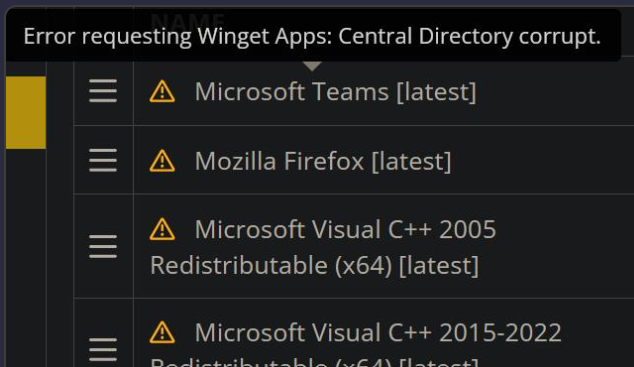
I've been keeping the images light with no app installs if the app is available to be managed with UAM. A tech reimaged a host last night, none of the apps deployed due to this Winget CDN issue.
Issue wouldn't come up if the image had the apps on it and was automatically updated like host pools with a deployment policy.
This also wouldn't be an issue with a private repository.
Hi Randy Lehman ! We were having the exact same issue. I'm told it began 10 April, 1:10:11 PM EDT. My colleague had to do a lot of scrolling to find that. Nerdio support's suggested updating NMM (we're on 5.8.2; didn't see the hotfix 5.8.3 until now). But, as of 12:40 PM EDT, it fixed itself. Which is great, because I have a strict policy of not breaking things on Friday. I hope it's working for you too.
I'll probably upgrade to 5.8.3 Monday. Maybe 6.0.0, to see the new features, but I generally stick to the GA releases.
I have the same “No Break Friday” policy. :D
We updated to 5.8.3 Tuesday morning. It did not fix the issue.
I manually ran our deployment policy this morning and it ran successfully.
Hopefully this is permanently fixed.

Just found this thread, and my personal preference based on limited use of UAM so far, is to make and keep the image as golden as possible. I typically set images to update once a week if QB products exist, once a month if no QB products (or no other high frequency updaes required). And we run the app deployment on the images (save time where we can). We prefer the ability to quickly redeploy an image without having to wait - and the image is gospel. With the introduction of UAM and the intermittent CDN issues - I still feel like its better to have a recent enough version on the image, than to risk not having it at all after a reimage action.
We also typically get a number of specialized third party apps for each customer (be it QB, Sage or something else) where troubleshooting or other investigation on the image is necessary/approrpiate) - so it helps build a case to drive from the image with things installed.
What I am hoping to reach a position with in time, is a place where we can re-deploy apps to images with UAM. Winget integration with NMM is a huge win there, it gets us a LOT closer - but not 100%.
Noting that this thread is a bit dated - but recognizing we felt the same pain - has anyone else experienced more Winget CDN issues since this notable event in early to mid April?
Hi John Tokash, if there have been any problems recently, it's Chrome, probably because it's updated frequently and deployed universally. And maybe because our maintenance window probably coincides with when Chrome updates get pushed to repos. The problem is that when a new version is detected, the current installation is uninstalled before the new version is downloaded and has its hash verified. Occasionally that leaves someone without Chrome.
My colleague was seeing a similar problem with MS 365 Apps, but that was with Intune, where UAM doesn't have maintenance windows. We had to stop updating 365 Apps with UAM.
I recently started making application groups for UAM, which makes it a lot easier to deploy apps to images. I just have to select the group for all hosts and images (Chrome, 7-zip, etc.) and the group for that specific host pool. I make the groups at the MSP level because then I can assign the groups to accounts, which is a lot easier than assigning applications one at at time.
Please sign in to leave a comment.
Comments (8 comments)