Install Console connect to multiple machines as a single action

There is the options when first enabling Console Connect to select multiple machines to have it installed to but afterwards you have to select each machine individually to install the agent. As new machines are joined to Intune, they do not have the agent installed so selecting each one to install the agent is time consuming and error prone. I would like to be able to select multiple machines (or better yet select all machines) and install the Console connect agent if not already installed as a single job. 

This would be be added to the bulk action button for devices. 

Logic would be to check if Windows, check if not already installed, and then to install the agent. 

3

Comments (5 comments)

1
Avatar
Dave Stephenson

Great call out, James Knorpp!

Being able to bulk deploy the Console Connect agent would be a game changer!
Another thing that could be cool is if there was a way to do a check to make sure that it is deployed and deploy it if it isn't. It seems similar to how our Unified Application Management Deployment Policies work. 🙂

0
Avatar
Ryan Dorman

Hear hear!  I envision it being like backup policies.  A predefined settigns for different objects - Desktop Images, Server, Personal Hosts, Pooled Hosts.  Bonus points if the auto remove from desktop images happened to the clone so you dont have to reinstall CC after every set as image.

0
Avatar
Dave Stephenson

We're getting closer on this.
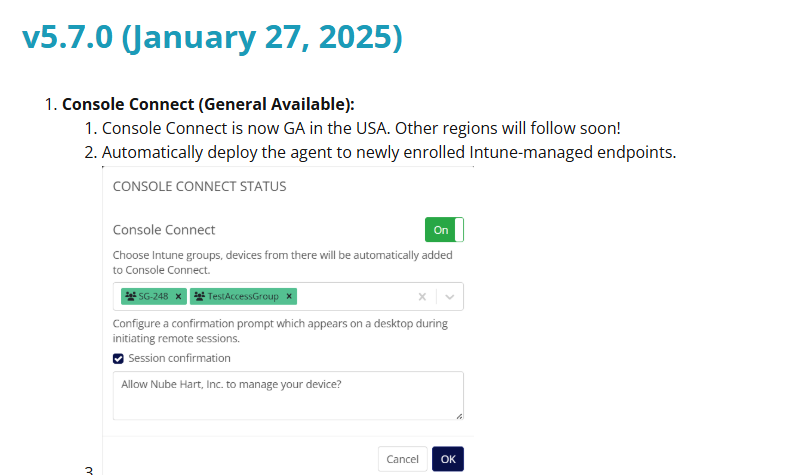
In the v5.7.0 release, our Product team added the ability to automate the deployment of Console Connect to Entra Device Groups (that are Intune managed).
Do you think that'll do what you're wanting?

0
Avatar
Ryan Dorman

The issue I see with Entra groups is that not all objects are going to be in Entra groups depending on their directory profile.

0
Avatar
Dave Stephenson

Hmm. Good point, Ryan. If you're utilizing Entra DS, this won't work.
Our product team will need to take that into consideration.

Please sign in to leave a comment.