
I was recently working with a partner who was getting the prompt (in the screenshot below) when connecting to their Entra ID Joined AVD Host Pool.
Obviously, I directed them to the Microsoft KB (Configure single sign-on for Azure Virtual Desktop using Microsoft Entra ID | Microsoft Learn), but I thought, why don't we take this further and make it part of NMM by utilizing this script (see NMM-SE/CloudShell/EnableSSOForEntraId-DynamicGroup.ps1 at main · Get-Nerdio/NMM-SE) and automatically create a dynamic group based-on the Entra ID joined AVD hosts.
Right now, it's just a separate script that can be run from Azure CloudShell, but I think it'd be great to be able to have an option added to the Identity Provider options so that you can choose whether you want to enable the setting or not.
(similar idea here AVD SSO Configuration – Nerdio Help Center)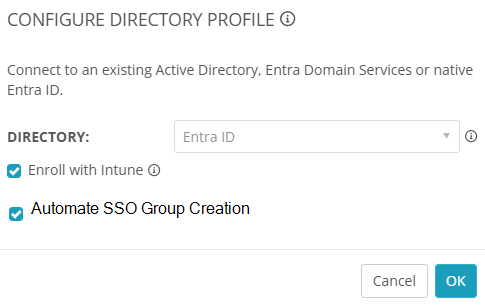
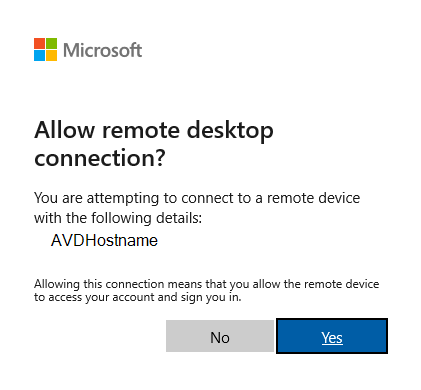
Automate the hiding of the "Allow remote desktop connection?" (EntraID)

I would really like to see this integrated as well like in your screenshot.
I had also noticed this pop-up message and I think other people will as well as more companies start to move to Entra ID joined host VM's.
Can we just run this script as is under the VM Deployment or do we need to edit variables first?
Thanks, Jason!
You can run this script as is* (see caveat below), but it needs to be run from the CloudShell in the customer's Azure portal or a local PowerShell window with the Azure PowerShell Module.
Because it's a dynamic group, as hosts are added/removed, from the group so you don't need to run a script on VM Creation/Deletion.
Obviously, you could always do that (separate scripts to add/remove your hosts to a static group) if you prefer, but the dynamic group is a lot more "set it and forget" and the script just needs to be ran once per tenant. 🙂
Caveat
If you do want to modify the script, all you would need to modify would be the $groupName and/or the $groupDescription variable(s) to fit with your Group Naming Scheme. Other than that, the script is fully ready to deploy without any customizations.
# Define the dynamic group details
$groupName = "Device|AVD&W365Hosts"
$groupDescription = "This is a dynamic device group for EntraID joined AVD & W365 Hosts"
Please sign in to leave a comment.
Comments (2 comments)