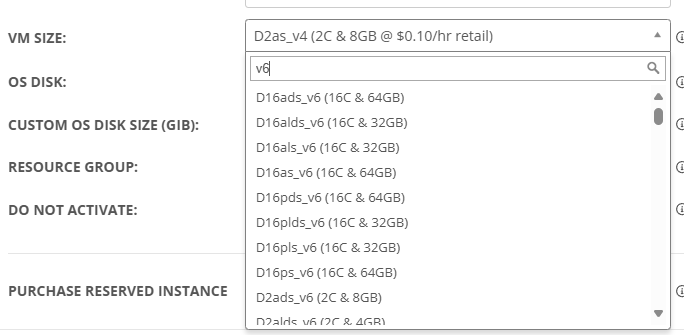
Add New AMD v6 VMs

Please add the new AMD v6 VMs as they are now GA. Details here: https://techcommunity.microsoft.com/blog/azurecompute/new-daeafav6-vms-with-increased-performance-and-azure-boost-are-now-generally-av/4309381


We would like to take advantage of the significant performance improvements.

5

Comments (18 comments)

1
Avatar
Dave Stephenson

Thanks, Brandon!

v6 VMs should start showing-up, if they're available in the region you're in, already, but they could be missing pricing information.
I believe the pricing information is something that needs to be updated on Microsoft's side with the API, but I'll double-check with our product team to make sure.

0
Avatar
Brandon Rutledge

Hi Dave,

Thanks! I see them in our NMM instance now. They were not there yesterday and I hadn't checked again today. I think jumped the gun a bit.

0
Avatar
Dave Stephenson

No worries. 
That's how it is with some of the API connectors we utilized with Microsoft.
One day they're there, the next they're not. (and vice versa) 🙂

0
Avatar
Johnny Lambert

I don't see them in our instance, and we just upgraded to 5.5.2

0
Avatar
Dave Stephenson
(Edited )

Because the v6 SKUs are so new, not all of the Regions/Datacenters have them, yet.

Which Region(s) have you tired, Johnny Lambert?

I checked these regions and I was able to see the v6 SKUs:

  • Australia East
  • East US2
  • East US
  • Central US
  • West Europe

I wasn't able to get them in these regions:

  • UK South
  • South Central US

That's definitely not all of the regions. Just the regions I checked really quickly in one of our demo environments.🙂

1
Avatar
Johnny Lambert

This...This makes total sense, and I just tested East US and found it. Appreciate you!

1
Avatar
Dave Stephenson

No worries, Johnny.

It's definitively one of those FOMO things.
Everyone wants the new hotness. 😂

0
Avatar
Travis Lamming
(Edited )

One thing is that these puppies use a new NVME drive controller, so they arent compatible with disk images that use the older vm's scsi disk controller driver. I just tested this on 6.1, and it doesnt appear that I can gracefully move between v5 and v6 images. So, would we need to build a desktop image from scratch?

Another thing to worry about is the limited amount of v6 hardware out there. If we build these and give them to users, and they become scarce, we would not be able to gracefully downgrade to v5 or v4 versions of vm's to get people on, because the disk controller drivers are different.

Here is the error you get when you try to resize to a v6 from v5 for example:


VM resizing to Standard_D4as_v6: /sub…2/goldImage

Error: The VM size 'Standard_D4as_v6' cannot boot with DiskControllerType 'SCSI'. Please check that the disk controller type provided is one of the supported disk controller types for the VM size 'Standard_D4as_v6'. Please query sku api at https://aka.ms/azure-compute-skus to determine supported disk controller types for the VM size.

2
Avatar
Brandon Rutledge

Images that support NVMe also support SCSI. I've tested this myself. It is a multi-step process to convert an existing vm, so I only recommend it if recreating your vm's would be labour intensive. Below are the steps that worked for me.


To convert an existing vm to NVMe I recommend reading this article: https://techcommunity.microsoft.com/blog/sapapplications/converting-azure-virtual-machines-running-windows-from-scsi-to-nvme/4192583 (I have not tested the script from the article on a vm with multiple attached disks).

I found in addition to the steps in that article I needed to boot the vm in safe mode once after running the conversion script so that it wouldn't blue screen at boot. Once a desktop image vm is booting with a NVMe controller you need to edit the Azure tags to add “WAP_DISK_CONTROLLER_TYPES = SCSI, NVMe” to tell NMM that the image created supports NVMe controllers.

Finally assuming you are using Azure compute galleries to store your images, you need to either create a new gallery or delete all existing images and the image definition so that when NMM recreates it the “Higher storage performance with NVMe” property has a value of NVMe (it cannot be changed after it is created).

1
Avatar
Dave Stephenson

Thanks, Brandon Rutledge 🤩!

For some reason, I thought we couldn't do this with Windows VMs.
We'll have to try this out and possibly find a way to automate the disk controller change in our product.
I could see a lot of partners benefiting from automating this conversion process.

1
Avatar
Travis Lamming

Brilliant work, it’s like the old days swapping from scsi to ahci, only with azure sauce. Really would be awesome to automate this. 

1
Avatar
Travis Lamming
(Edited )

Carl Long  Not completely, new images support that, but there's no real automated way to take older desktop images and make them work on v6 sku's other than with the work around. 

Here is what the work around looks like right now, while your guys look at automating it:

Workaround
1) Add/Update Tags in Desktop Image: WAP_DISK_CONTROLLER_TYPES to "SCSI, NVMe"
2) Change GUID in Desktop Image and ACG image using Online GUID Generator (https://www.guidgenerator.com/) for tag: WAP_IMAGE_GUID
3) Remove ASSOCIATED_IMAGE_ID tag on the Desktop image VM
4) Set as Image
 

I'm going to test this out on a personal desktop image I have that is on an e4as_v5, and I want to move it to the fancy new v6 horsepower

It would be cool if on our images we could have Nerdio detect what disk controller is used, or just tag them if they were made prior to v6 support.
 

2
Avatar
Carl Long

Travis Lamming  - Nice catch and thank you for dropping a potential solution!

1
Avatar
Travis Lamming

No problem, your guys have been helping me for a long while on this one, just passing it on!

0
Avatar
Nathan Thornton

Travis Lamming I am following the above solution to migrate from _v5 to _v6. It stills give me error when try to resize my GoldenImage. I was able to create a new image with _v6. Are there any other steps or gotchas in the solution? 

0
Avatar
Dave Stephenson

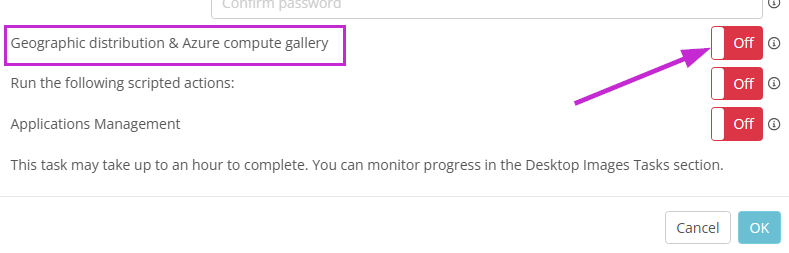
The main thing I've seen, in helping partners, is that you need to utilize an Azure Compute Gallery for your image.
If you don't, you won't be able to choose a v6 SKU when deploying a host pool/host.

The one thing to keep in-mind that if you change to an ACG image, your imaging versioning will start over at v1.0.0.

0
Avatar
Peter Yasuda

Be aware of this if you plan to install SQL Server on a v6 VM: 

https://learn.microsoft.com/en-us/troubleshoot/sql/azure-sql/sql-installation-fails-sector-size-error-azure-vm

The default sector size for v6 VMs is 8k, and that is not compatible with SQL Server. There are workarounds, and this does not apply to SQL Server VMs from the Azure Marketplace. 


Please sign in to leave a comment.