
I wanted to send this out there to see if anyone else is seeing the same things i have with a fairly new "issue". I have 2 different clients now (and testing a 3rd/4th) where they have an issue editing documents in Bluebeam but only on Windows 11 session hosts. When they are moving items (markups, stamps, drawings, ect..) in a bluebeam document with either the mouse of keyboard arrow keys there is a considerable lag betewen when they move them and when the item on the session host actually catches up and moves to where its supposed to. They can log into a Windows 10 session host and open the same file using the same version of bluebeam and have no issue.
We have changed redering settings inside bluebeam, checked driver versions, updated the AVD Client but nothing seems to make a difference. Im not entirely sure what inside Win11 would cause something like this. The host pool has the exact same settings and FSLogix profiles use the same settings and even profile disk, just specific to WIN11.
Bluebeam Revu "lag" working on Windows 11 AVD Session Host

What SKU are you using? Our Bluebeam users are on NC skus and that seems to have resolved 90% of their lag issue.

Hi Phil,
Have you found any solutions to your BB slowness and lag in Windows 11 AVD SH?
Experiencing the same, Win 10 with the same BB version runs great but extremely slow in Win 11.
Thank you
I think i stumbled across the underlying issue and at least a short-term workaround. If you are redirecting webcameras in the AVD session hosts and the user has a webcam connected and enabled it causes the issues in Bluebeam (nothing else that i have found, just Bluebeam). If you disconnect or disable the webcam everything is fine in Bluebeam. I wasn't aware of it till now but Bluebeam has a feature that lets you take a picture from the webcam and insert it into the PDF, i assume there is some underlying background app access/conflict in Windows11.
My workaround currently is to disable access to Bluebeam in the Windows Settings for "Let apps access your camera". 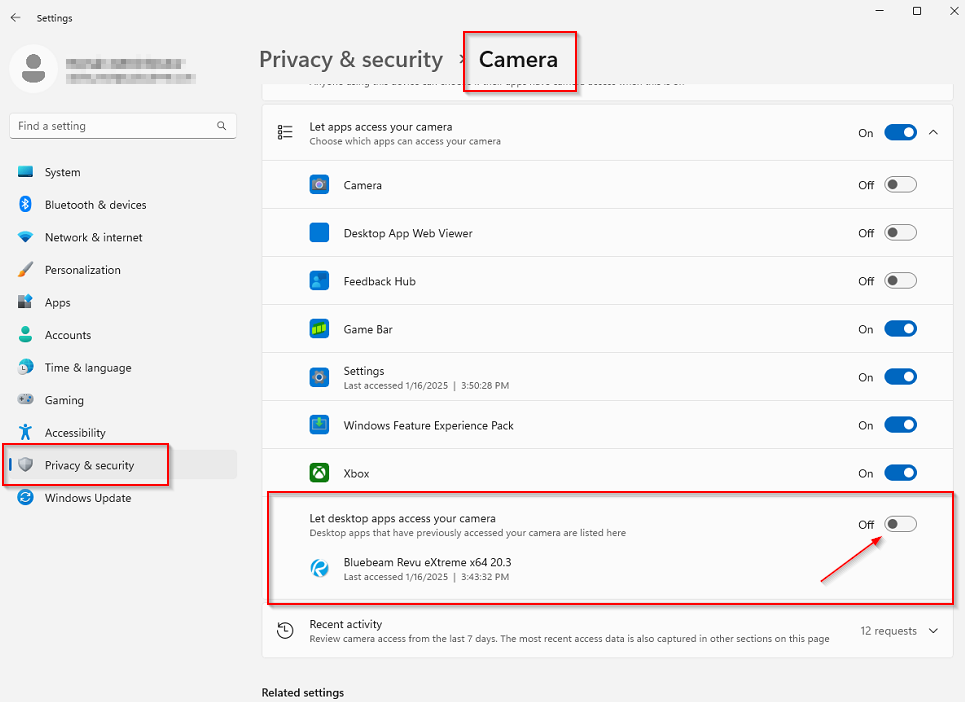
I also just realized that using this workaround will disable camera access for "any" desktop app. More specific any non-UWP/Appx/MSIX/Microsoft Store app, for example Zoom but New Teams is ok since its an MSIX package.
Thank you Phil, this worked! Luckily we are only using Teams so it should not impact other apps. I will get a hold with BB support to see if we can disable the "Camera" feature from the app using a registry key or something.

Hi there, I'm also running into this issue. Any luck finding a registry key or anything to disable access to the Camera for Bluebeam only?
Rwilkinson - Bluebeam support did reply and said they are aware that it is an issue affecting Azure VM's but they didnt have anything to resolve the issue but are looking into it. Disabling the App Access temporarily to the Camera in windows settings is the only "usable" workaround i have found so far.

For anyone wondering, I just finished a support call with Bluebeam and disabling the camera was their solution as well.
William Emmons Thanks for the update, i never did hear back from Bluebeam support about the “issue”. I recently updated a client to 21.6 and it didn't change anything in this regard.

I am also having this problem and disabling the camera did not help. Running BB 21.7 with N series VMs and we are seeing this slowness.

Adding my 2 cents. This is still an issue in Bluebeam Revu 21.8 in Win11 24H2 single-user AVD sessions. The camera workaround works instantly. I'll be opening a Bluebeam support ticket.
Bluebeam support says they only support Citrix and I can go kick rocks.
Randy Lehman They blew me off on supporting Azure GCCH Gov Cloud, so at least they're consistent…
Anyone try enabling RemoteFX USB Redirection to see if it helps?
Please sign in to leave a comment.
Comments (14 comments)