AUtoscaling Default Host

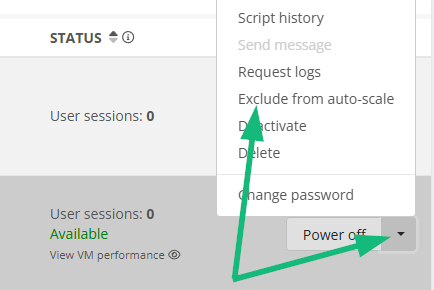
Hi,  Is there a way to set a specific host to be the default host to be left on and not deactivated during autoscaling?   I have a user that needs to have a better chance of getting assign a specific host for some 3rd party MFA where it requires it to be configured and tied to a specific host name.  Yes, she is not guaranteed to get on it, but atleast it will be powered up and available.


Unless there is a way to force a user to a specific host....

0

Comments (1 comment)

1
Avatar
Dave Stephenson

Hey, Troy!
As far as I know, there's not a way to force a user to a specific host without putting an individual host in a separate host pool. 
I asked the Microsoft team about this at NerdioCon23 and they confirmed the same thing. 😞

You "technically" can force a specific host to stay on, but if that host is reimaged, you'll likely need to do it again.
Although, to be honest, I haven't testing doing a reimage after doing these steps to know one way or another. 🙂
Additionally, if someone is logged-on to one of the other hosts, you could potentially be paying for multiple VMs to be online longer than you'd expect.

  1. Get a Reserved Instance for the number of AVD Host(s) you want to remain on
  2. Power-on the host you want to remain on
  3. Exclude that host from AutoScale


Please sign in to leave a comment.