
Since it directly affects the cost/bill for Azure services, leaving a Desktop Image running can be a concern. Currently, there is the alert banner when opening that menu section. I would like to see that same alert banner information utilized to send an email alert like many other event triggers.
Desktop Image Left Powered On Alert
3

I think we may already have this feature in our Notifications. (Power off desktop images left running)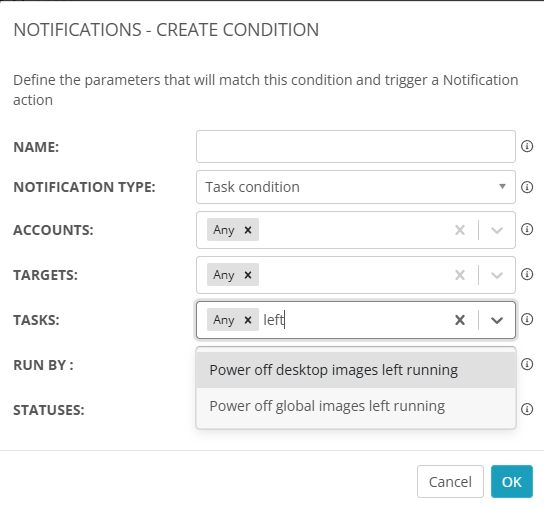
If that doesn't work, we do also have the Unused Resources Report where you can schedule it to run against any VMs that have been on for over ## hours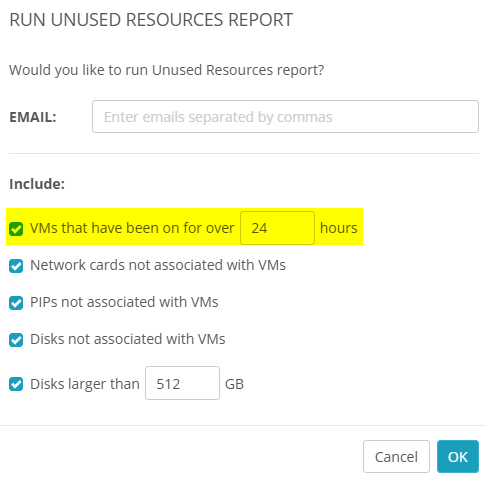
Will either of those do what you're wanting?
I attempted this and did not seem to get alerts when a technician left a desktop image running. When it did not alert, I submitted a support ticket and was told it did not alert for that precisely. Azure cost alerts were recommended. But as for the Unused Resources report that would not be a user friendly method to keep a check on Desktop Images status.
Ahh. Thanks, Andrew.
I think I'm understanding the difference between what we have and what you're wanting.
The Power off desktop images left running notification is for when you click (or automate) the Power off and Set as Image button/task, but what you're looking for is more tied to the Desktop Image being turned on and forgotten about.
What we need is a Start Desktop Image Left Running task to capture those Desktop Image VMs that are left-on
The one thing that I can see possibly causing a problem is the notifications for this.
If we don't put a time-frame on it, you'll be getting a LOT of notifications anytime a Desktop VM is started.
Here are a few possible workarounds to that concern that I thought of:
(These are just my brain working so don't feel bad telling me "that's stupid" or "That won't work for us". I won't be offended 🤓)
- Make a Start Desktop Image Left Running 8+ Hours notification, but we currently don't have a way to define how often we want to be alerted.
We could potentially add a "frequency to notify" option to work around the notification concern - Modify (or create new?) the Start Desktop Image approval workflow for a flag that checks if a Desktop Image without the Schedule power off box being enabled.
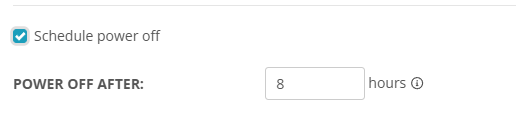
- Create an Azure Runbook that automatically checks for any manually started running Desktop Images (without the Schedule power off being configured) and shut them down automatically
- All of the above (I want options and all of those could be useful for different customers)
Of those options, would any of them be better than another?
Or, is there something else we (the Nerdio Community as a whole) should consider about this?
Several of these options would be good. A global notification that we could set to alert us for a set amount of hours would be my first choice. A runbook is possibly a solution, but it would need to be something we could set globally. Setting a runbook per customer seems like it would leave to much of a chance that it could fall through the cracks and not be done until after an incident occurs. A suggestion I would be interested in seeing, if possible, is what about instead of the power off setting being an option you choose, make it a default setting and not rely on a human to remember to select it.
Hmm, very valid points.
I like your last suggestion as a potential Band-Aid fix.
Instead of needing to manually "opt-in" to Schedule the power off, make it so someone has to go out of their way to NOT schedule the power-off.
I'm wondering if any other partners would be unhappy with that kind of change? 🤔
Ooo. We could take this one step further and make it so there's an approval triggered if someone wants to have a Desktop Image on for more than 8 hours.
We may be getting somewhere with this . . .
Please sign in to leave a comment.
Comments (5 comments)