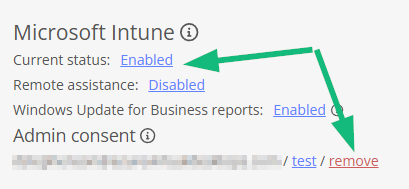
Reminder to remove admin consent user when turning off Intune integration

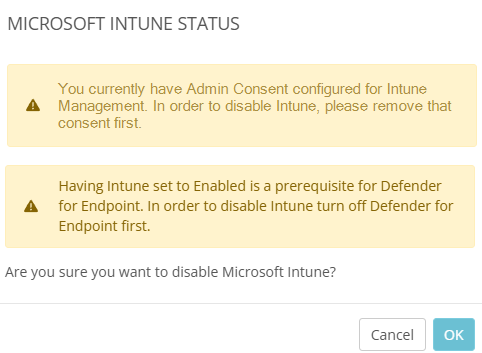
It might be nice to add a dialog box when disabling the Intune integration to either offer to remove the admin consent user or at least a reminder that it needs to be removed manually. Otherwise, if the user is left there and admin consent expires, Nerdio logs a task error that is a bit cryptic and doesn't easily lead to the root cause.


Thank you,

Christian

0

Comments (3 comments)

0
Avatar
Dave Stephenson
(Edited )

Christian Nancy, if I'm understanding your ask correctly (see below), it looks like it may be more of a bug than a feature request. But honestly, it could go either way from the Development Team's perspective. 🤣
Do you happen to have the error message you were getting or what was the task that generated the error? 


You're wanting either a dialog box saying you "you need to remove the consent" or automatically remove the consent so it doesn't generate an error in the future?

1
Avatar
Christian Nancy

Here you go (one of many, the error was generated twice a day for over a month):


This is an automated alert notification from Nerdio Manager for MSP
Name: TestAndRefreshAdminConsentTokens
Status: Error
Type: TestAndRefreshAdminConsentTokens
Run by: UserAuthorizationsSchedulerUser
Targets: Job: Test Authorizations
Start date: 10/10/2024 12:27:06 PM (UTC) Coordinated Universal Time
Duration: 0s 
List of Executions for this Job: 
Start date: 10/10/2024 12:27:06 PM (UTC) Coordinated Universal Time
End date: 10/10/2024 12:27:07 PM (UTC) Coordinated Universal Time
Run by: UserAuthorizationsSchedulerUser
RunMode: Default
Result: Failed
NameStart / CompleteStatusResult
--- --- --- --- 
Oct 10 2024 12:27 PM    Start user authorization token checking
Oct 10 2024 12:27 PM    SuccessDuring testing an admin consent error occurred for the account Wooden Spoon Managed IT Services for Intune:
Oct 10 2024 12:27 PM    Complete failed task
Oct 10 2024 12:27 PM    SuccessException: Errors occurred during execution, see log details. Please login to your Nerdio Manager for MSP install for more information.


Wait, are you saying that the screenshot you provided is already the message that is being displayed and I simply missed it? Or is this a mockup of what you'd propose the dialog would look like?

-Confused

0
Avatar
Dave Stephenson

Thanks, Christian.

Haha, sorry about that.
Yes, it's a mock-up (apparently a pretty convincing one 🙂) that I threw together really quick.
I'm a visual person so if there's a picture or screenshot, it helps me understand.
We already have the warning to disable the Defender for Endpoint feature so adding a similar prompt for the Admin Consent should be possible as well.

Please sign in to leave a comment.