
For some applications such as DNS Filter to function on multisession hosts, a secondary NIC card is required. You can manually add these within Azure as I have successfully done that. It would be nice to be able to add a secondary NIC directly in nerdio that gets caught with the image, so that when reimaging hosts I do not have to manually manage the NIC cards.
Option for Secondary NIC for Hosts
0

Welcome to the community, Renee Jessee 🙂!
I've never had a partner ask to add a second NIC to a session host so it's cool that you're going down that path.
Not to naysay your idea, but it could be a bit before your great idea is implemented simply because there may not be too much of a demand for it, yet.
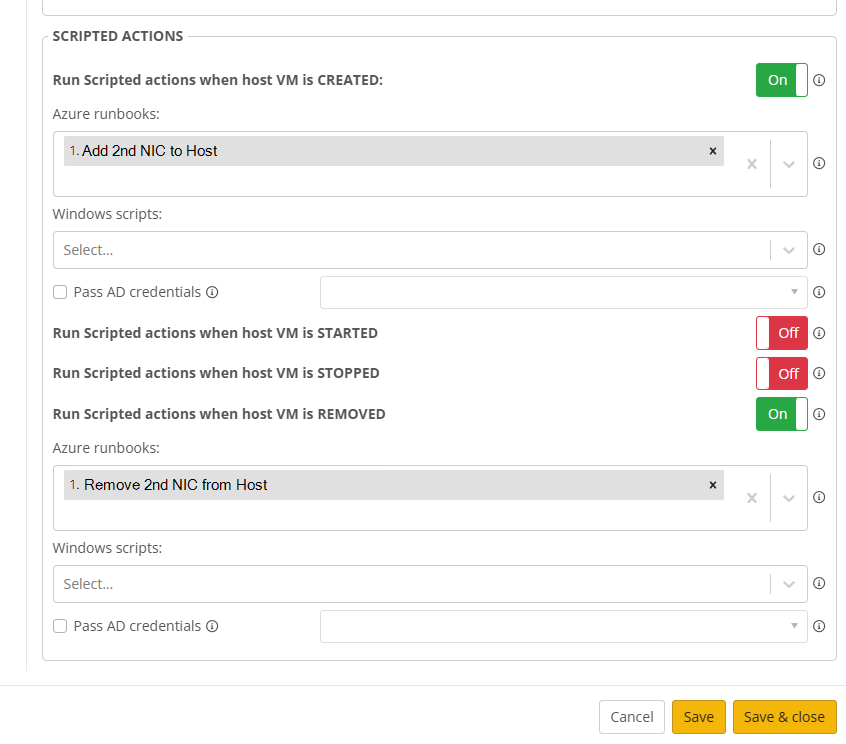
It's likely you could do this right now, without waiting for the feature to be implemented, by writing an Azure RunBook to automatically add (and/or remove) the second NIC as part of the Host Pool deployment process (see screenshot below).
I'm not too much help on the scripting side of things (my scripting skills are mediocre at best 😞), but I'm guessing it wouldn't be too hard to make a script to do the add/remove for you.
We have a few (similar) script examples that might point you in the right direction.
Or, another partner may already be doing this and be able to share it with you.
Worse case, there's always the "GPTs" of the world that can help create a script for you.
Example from ChatGPT:
param (
[string]$resourceGroupName,
[string]$vmName,
[string]$nicName,
[string]$vnetName,
[string]$subnetName
)
# Import the Az module if not already imported
Import-Module Az
# Login to Azure account (if not running in a managed identity context)
# Connect-AzAccount
# Get the VM
$vm = Get-AzVM -ResourceGroupName $resourceGroupName -Name $vmName
if ($null -eq $vm) {
Write-Error "VM $vmName not found in resource group $resourceGroupName"
return
}
# Create a new NIC
$subnet = Get-AzVirtualNetworkSubnetConfig -Name $subnetName -VirtualNetwork (Get-AzVirtualNetwork -Name $vnetName -ResourceGroupName $resourceGroupName)
$nic = New-AzNetworkInterface -ResourceGroupName $resourceGroupName `
-Name $nicName `
-Location $vm.Location `
-SubnetId $subnet.Id
# Attach the new NIC to the VM
$vm.NetworkProfile.NetworkInterfaces.Add(@{Id = $nic.Id})
Update-AzVM -ResourceGroupName $resourceGroupName -VM $vm
Write-Output "Successfully added NIC $nicName to VM $vmName."
Whichever way you go, I'd be curious to see what solution you end-up with. 😎
Please sign in to leave a comment.
Comments (1 comment)