
Traditionally and in the grand majority of our users we are deploying the MSI install from the direct link
What's new in the Remote Desktop client for Windows - Azure Virtual Desktop | Microsoft Learn
We have been keeping an eye on the new store app (Azure Virtual Desktop Preview) as the old store app is hot garbage (Microsoft Remote Desktop)
And now i come across this (new to me) "Windows App" which can also connect to AVD.
What is Windows App? - Windows App | Microsoft Learn
This app has apparently been out for a while and I just never found it or the AVD integration is new.
We were waiting until the "Azure Virtual Desktop Preview" app stopped being in preview, even though the update track is identical to the msi, but its been in preview for such a long time now that im thinking they forgot to remove that part of the title.
Finding the Windows App makes me think this may be where the non-preview version went so it may be the way to go. Unfortunately the updates are note similar so its hard to see if its the same bugs being fixed which would tell me it is just a face lift or if the app is fully different.
Has anyone tried each of the clients / deployed to have more experience with the differences. Did you find any quirks to keep an eye out for?
Any other thoughts?
AVD connection client
1

I've been playing with the Windows App (https://aka.ms/windowsapp) since it was in preview and have liked it a lot.
Depending on your needs, it could be "the one app to rule them all" 🤣
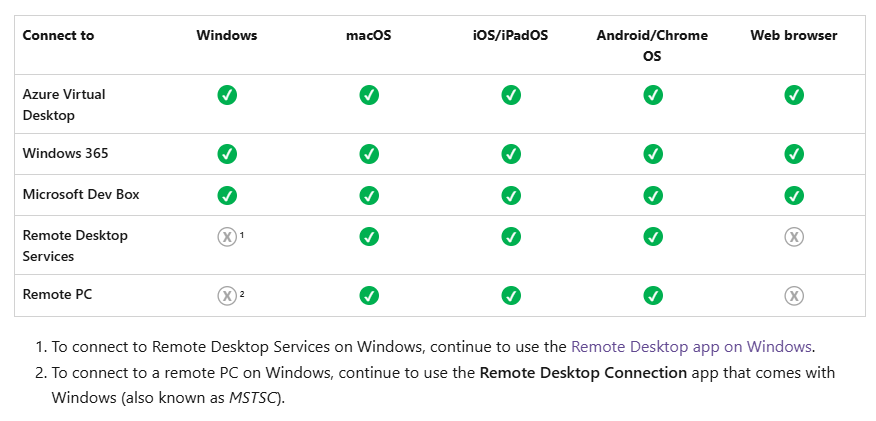
Jokes aside, I have noticed a few quirks/things I like.
Windows App
Pros
- Easy/Slick
- All* of your services/connections under a single app
- Simple interface with the option to favorite your
Cons
- No "refresh" (to refresh the subscriptions, you need to switch between users or exit the app)
- Occasionally crashed (when it was in preview), but I've had the Remote Desktop App crash too
- No shortcuts? (I believe I saw somewhere that Microsoft is phasing out the ability to create shortcuts and setting programs to autostart)
Remote Desktop App
Pros
- Users are used to the app
- Ability to see all of your accounts in one view
- Ability to refresh your subscriptions
Cons
- Not able to favorite desktops or remote apps
- Need to scroll through all of the accounts to find the one you're looking for
- When you refresh a subscription, the order of the accounts jumps around
I'm not sure if other people noticed something else, but those are the major things that stood out to me.
Yeah we decided to have a couple "trusted users" test for us and give their feedback if they notice any differences.
I know a few users that will be pissed about the no shortcuts part unfortunately. Its funny how the feature that hardly effects anything will set the entire tone though.
Please sign in to leave a comment.
Comments (2 comments)