Reporting on hosts running over 24 hours or Auto-Scale disabled

I use the "unused resources" report extensively, it is a great resource for spotting would could be expensive little surprises.   However I am discouraged that a machine running longer than 24 hours still shows on the report, despite being "reserved".    I'd love to see that improved such that in a good clean running environment, the report would be blank or not sent (Because it is blank) - when a reserved VM is running past 24 hours.

An added benefit would be some reporting on Session Host pools that do NOT have auto-scale turned on.    I have operations resources that jump to disabling auto-scale instead of 'excluding hosts from auto-scale' - and it is easy to get forgotten once the task of concern is complete.    Even just visualizing the auto-scale is NOT enabled (make the host pool row a different background color)  Unfortunately, the unused resources report doesn't highlight that until well after some notable expenses have been incurred.

2

Comments (9 comments)

0
Avatar
Tony Cai

Hi John,


There is a feature to temporarily pause autoscale so you dont have to actually turn it off, you can pause for a period of time, after that, it will auto resume its previous autoscale plan.

0
Avatar
Felix Barba

Still, it would be nice to have a visual indicator that scaling is disabled. in the same way there is the little clock Icon to show there is a scheduled resize

0
Avatar
Dave Stephenson

Good point. Some kind of visual indicator (maybe with a hover tool prompt?) that shows auto-scale is disabled for an individual host.
Right now, we just have to try and remember or manually enable/disable autoscale per host.

Out of curiosity, Felix Barba, do you find yourself disabling AutoScale often?
Or, is it you might occasionally disable it for testing and then forget to turn it back on?

0
Avatar
Felix Barba

Definitely happens more during testing.
and was more of an issue prior to Nerdio when we had old set of session hosts with issues we were band-aiding, and no Desktop Image ready to redeploy. 

1
Avatar
Dave Stephenson

Very true. Often times, when we're testing, we disable autoscale, but forget to turn it back on and end-up with a huge bill.
Maybe add some kind of notification for hosts that are running for more than X hours with Autoscale disabled and no Reserved Instance? 🤔
It might be difficult to get that logic to work, but it could possibly be the phase 2 of the visual indicator of Autoscale being disabled for a host.


1
Avatar
John Tokash

Circling back to my original claim

1- Having the "Machine running longer than 24 hours" report respect reservations would be a big win for that report

2- Reporting for, or at least visually highlighting, Host Pools with Auto-Scale disabled, would be a big win.     I use a global view for Host Pools to check in and make sure nothing is out of order, but the more pools I have, the easier it becomes to not notice that column is blank - highlighting differently from the rest of the view would be valuable.

0
Avatar
Dave Stephenson

Thanks, John (sorry for hijacking your post). 

What you're asking for is reasonable and seems to be a common ask.
For #1, I'm not sure we can take reservations into account because of the way they work (pooled hours based on SKU/Region), but we may be able to do something to work around that.

#2's ask shouldn't be too difficult because we're already displaying that info on the host pool screen.
It would just be a matter of adding that as a Global View or report option.


0
Avatar
John Tokash

On the related topics..

#1 - Am I missing something in how these reports work today?   Currently, if I associated a reservation to a specific server, NMM knows I have done the work to reserve the device, IMHO, unless the reservation in NMM is out of sync, exclude it from the "Running for more than 24 hours" report.   I can see the challenge though, that just because it is marked as reserved, does not mean Azure will appropriately apply the reservation to that particular machine.   However, without some relationship in the report, I don't find any use from the report in these scenarios, it creates noise that I have to manually determine if I have a condition to mitigate or not.   I would vote on the side of excluding it, since I've intentionally taken the steps to enter the reservation information.    As long as it is current, go ahead and exclude.   

To my starting point though, am I missing something on the value of the report as it works today?   If I report on an account with VM's running longer than 24 hours, and I have applied reservations, I am just getting a noise report that I still have to manually assess "should these be on?"  


On Topic #2 - This isn't a huge issue, but being able to add some highlighting to a global view for conditions like this would be most valuable I think.   It is never normal for us (and I suspect most MSP's running NMM) - to have autoscale completely disabled, unless it is still a build in progress, or troubleshooting an issue withere Autoscale is compounding the problem.    So highlighting if/when it is disabled *I* think would be useful to identify atypical conditions

0
Avatar
Dave Stephenson

Great questions, John.🙂

Topic #1

We can add reservations in Nerdio Manager, but on the Azure side, there's no way to say "This reservation is for VM1. NEVER use it for VM2."
It just sees it as "Oh, you have a reservation for 730 hours for an E8as_v5 VM in East US2? I'm going to use those credits for any VM in the Eas_v5 family in that region until those hours are used-up and then I'm going to start billing hourly for it being used."
It's a bit more complicated than that (because most things in Azure are 😆), but that's the general idea.

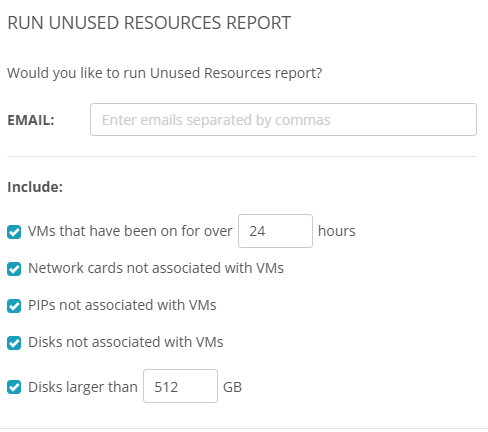
Right now, the unused resources report only has these options and doesn't know if something is reserved or excluded from auto scale (for Host Pools) so you have to have another method to manually check those exceptions.
If you get that report and then paste the data into a filtered Excel sheet that already has your reservations/exceptions filtered out, that may get you what you're wanting, for now.
Otherwise, like you said, it'll just be "noise". 😞

Topic #2

We do have a few partners who disable Autoscale on purpose for single-host host pools that are on a reserved instance, or like you said, disabled for WIP/Troubleshooting.
Maybe we could add an option to exclude from reporting when Autoscale is disabled and have that exclusion be tied to an Approval Workflow?
That way, someone can't disable Autoscale indefinitely and no one catches it.

Thoughts?

Please sign in to leave a comment.